Claude Marketing Skills: 98 Free Skills, Ranked by Job (2026)
Claude marketing skills are SKILL.md folders that teach Claude one marketing job and load only when that job comes up. This guide ranks the 98 open-source skills worth installing, by job, with the exact install commands for claude.ai, Claude Code and Claude Desktop, 12 copy-paste prompts, and how to write your own. Get the Ryze skills on GitHub.
Built by our community of 2,000 marketers
Free skills and prompts for paid ads and SEO
Templates for Claude, ChatGPT and Perplexity.
Used by 2,000+ marketers


The short version
A Claude marketing skill is a folder with a SKILL.md inside: a name, a one-line description of when it applies, the steps, the input it expects and the output it must produce. Claude reads only the name and description of every installed skill; the full file loads when your request matches. Install one once, and "find the wasted spend in this account" runs the same audit with the same columns every time, for everyone on the team.
Two open-source libraries cover most of what a marketer needs. The Ryze marketing-skills repo has 48 skill files for Google Ads, Meta Ads, SEO and AI visibility. Corey Haines' marketingskills repo has 50 skills across CRO, copy, SEO, ads, analytics, pricing and launches. This page tells you which to install for which job, where, and in what order. Both libraries are free; you need a Claude account to run them.
The short version
- Install first: Wasted Spend Finder, CPA Diagnostics, Creative Fatigue Detection, Weekly Account Summary
- Where: claude.ai (upload a zip), Claude Code (npx skills add …), Claude Desktop and Cowork (scheduled)
- What exists: 98 open-source skills across two GitHub repos, both free and updated in 2026
- The limit: skills analyze; live data needs an MCP connector; executing changes needs a separate layer
What are Claude marketing skills?
Anthropic calls the format Agent Skills. A skill is a folder containing a SKILL.md with YAML frontmatter (a name and a description that says when the skill applies), then the instructions, and optionally supporting files: checklists, benchmark tables, scripts. A marketing skill is that format pointed at one marketing job: audit a search terms report, diagnose a CPA spike, write the Monday digest, tear down a competitor's landing page.
The difference from a good prompt shows up on the tenth use, not the first. A prompt lives in a paste buffer and drifts each time someone retypes it. A skill is versioned, shared, and produces the same table with the same columns every run. When an agency runs the same audit across 14 client accounts, the skill guarantees account 14 gets the same rigor as account 1. Claude reads only each skill's name and description up front (progressive disclosure), so a library of 50 skills does not eat your context window.
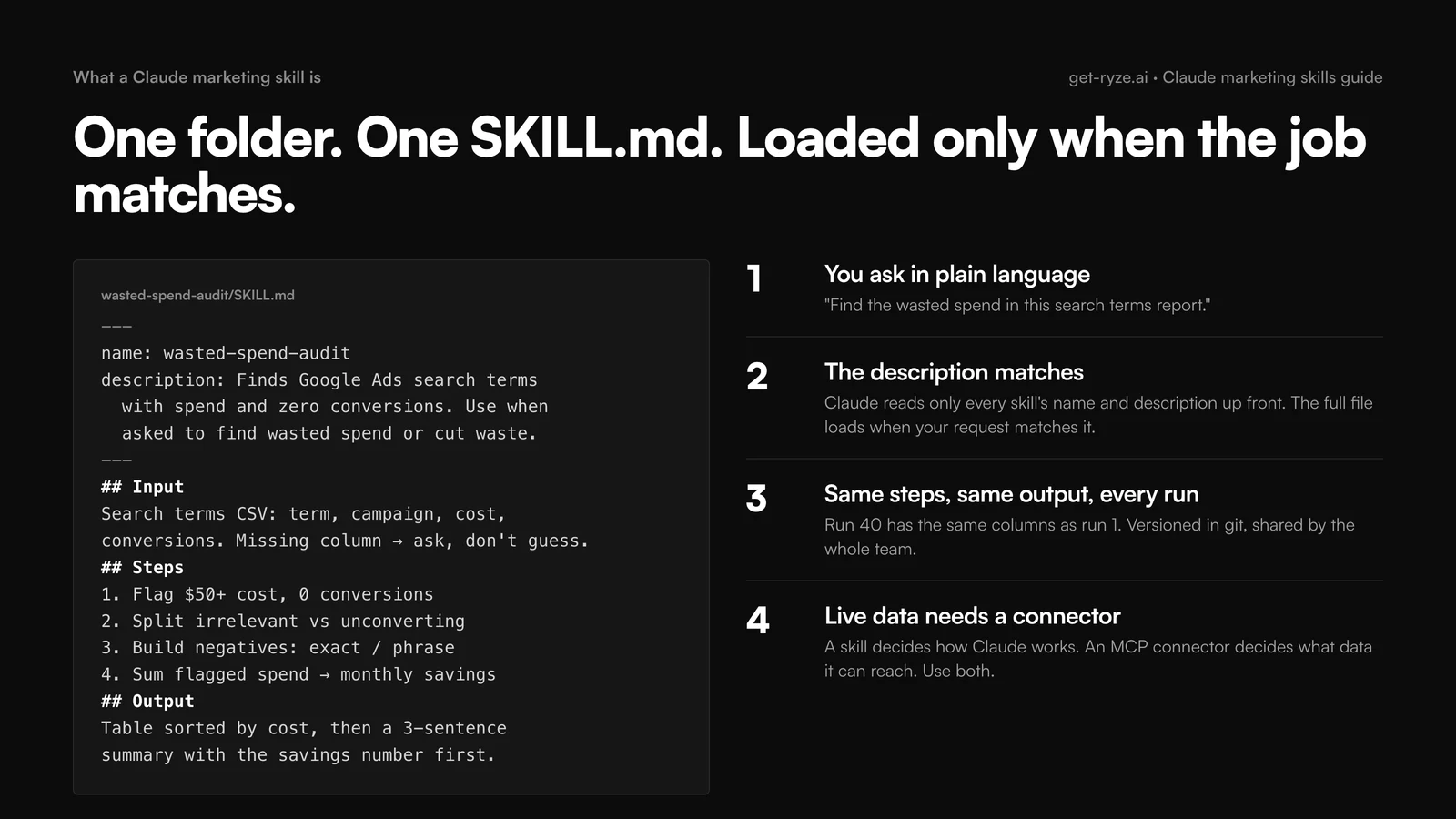
Skills decide how Claude works. They do not grant data access: a skill on its own works with what you paste or upload. Connect Claude to your ad accounts through an MCP connector and the same skills run against live campaign data instead of Friday's export. Nothing in either library executes changes in an ad account; that is a deliberate boundary, covered in the stack section.
Which Claude marketing skill for which job
If you install five skills and nothing else, install the first five rows. The rest map the most common marketing jobs to the one skill that handles them best, from the two libraries covered below. Sources: Ryze marketing-skills (48 files, paid ads, SEO, AI visibility) and coreyhaines31/marketingskills (50 skills, full marketing stack).
- 1Wasted Spend FinderRyze
Job: Find budget going nowhere
Run it: Weekly, Google search terms report
- 2CPA DiagnosticsRyze
Job: Explain a CPA jump
Run it: On demand, five causes in fixed order
- 3Creative Fatigue DetectionRyze
Job: Catch decaying Meta ads
Run it: Weekly, ad-level 30-day export
- 4Weekly Account SummaryRyze
Job: The Monday report
Run it: Weekly, scheduled in Cowork or Claude Code
- 5Client Report NarrativesRyze
Job: Client-ready monthly narrative
Run it: Monthly, plain-English five sentences
- 6Ad Spend AllocatorRyze
Job: Move budget to the next cheapest conversion
Run it: Weekly, marginal CPA across channels
- 7A/B Test AnalyzerRyze or marketingskills ab-testing
Job: Is this test significant yet
Run it: On demand
- 8marketing-planmarketingskills
Job: Quarterly marketing plan
Run it: Quarterly, feeds from product-marketing context
- 9product-marketingmarketingskills
Job: Position the product, once
Run it: Once; every other skill reads it
- 10AI Visibility Audit + ai-seoRyze + marketingskills
Job: Get cited by ChatGPT and Perplexity
Run it: Monthly
- 11Landing Page Audit or croRyze or marketingskills
Job: Landing page teardown
Run it: Per page, before scaling spend
- 12Content Repurposer or socialRyze or marketingskills
Job: Turn one post into a distribution kit
Run it: Per asset
| # | Skill | Source | Job | Run it |
|---|---|---|---|---|
| 1 | Wasted Spend Finder | Ryze | Find budget going nowhere | Weekly, Google search terms report |
| 2 | CPA Diagnostics | Ryze | Explain a CPA jump | On demand, five causes in fixed order |
| 3 | Creative Fatigue Detection | Ryze | Catch decaying Meta ads | Weekly, ad-level 30-day export |
| 4 | Weekly Account Summary | Ryze | The Monday report | Weekly, scheduled in Cowork or Claude Code |
| 5 | Client Report Narratives | Ryze | Client-ready monthly narrative | Monthly, plain-English five sentences |
| 6 | Ad Spend Allocator | Ryze | Move budget to the next cheapest conversion | Weekly, marginal CPA across channels |
| 7 | A/B Test Analyzer | Ryze or marketingskills ab-testing | Is this test significant yet | On demand |
| 8 | marketing-plan | marketingskills | Quarterly marketing plan | Quarterly, feeds from product-marketing context |
| 9 | product-marketing | marketingskills | Position the product, once | Once; every other skill reads it |
| 10 | AI Visibility Audit + ai-seo | Ryze + marketingskills | Get cited by ChatGPT and Perplexity | Monthly |
| 11 | Landing Page Audit or cro | Ryze or marketingskills | Landing page teardown | Per page, before scaling spend |
| 12 | Content Repurposer or social | Ryze or marketingskills | Turn one post into a distribution kit | Per asset |
The pattern behind the first five: diagnostics before optimization, and one reporting skill from day one so improvements are visible.
How to install Claude marketing skills
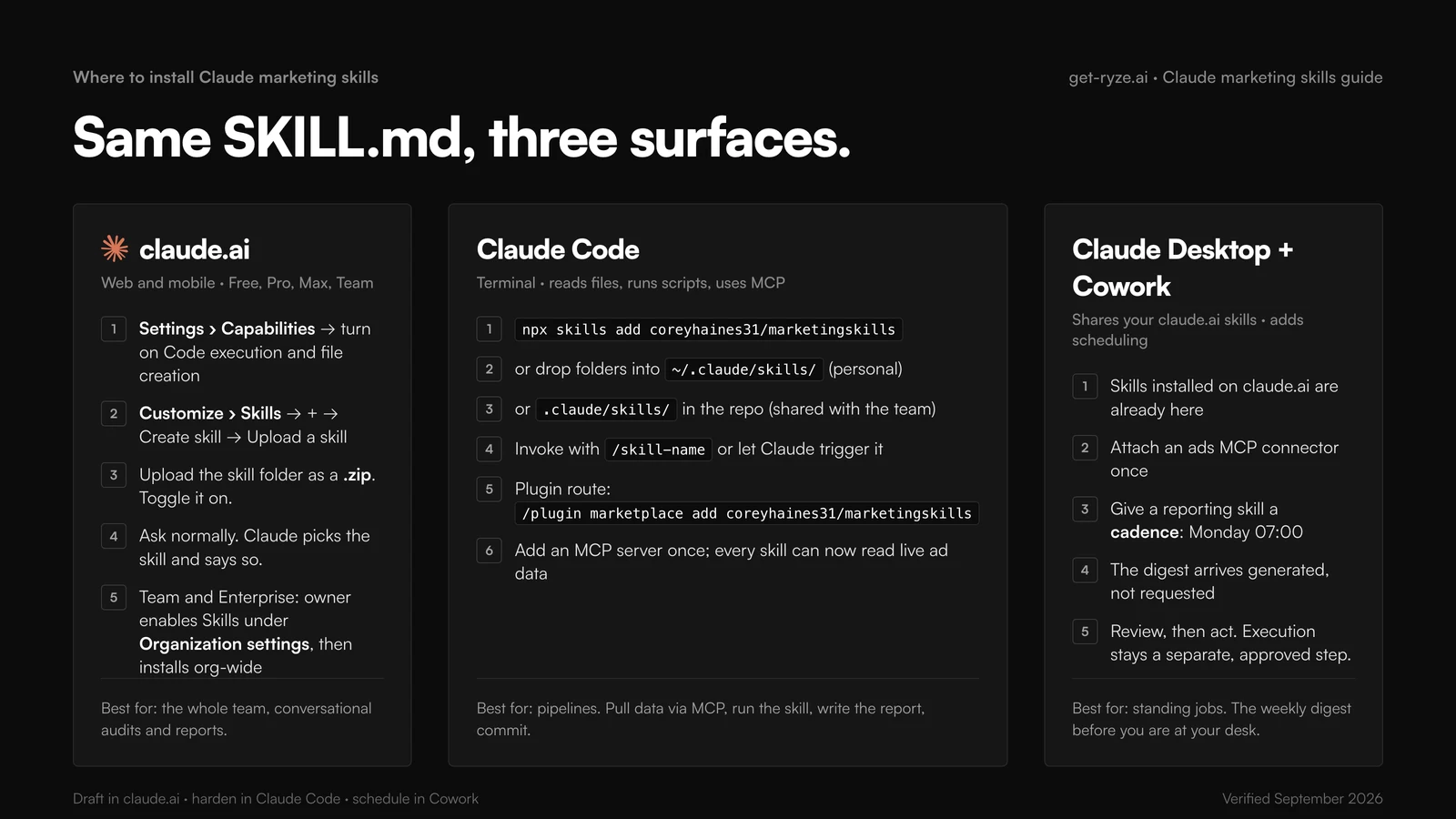
The same SKILL.md folder installs in three places, and where you install it changes what it can do. Steps verified against Anthropic's help center and the Claude Code docs, September 2026.
In claude.ai (web and mobile)
Skills are available on Free, Pro, Max, Team and Enterprise plans once code execution is on. Go to Settings › Capabilities and enable "Code execution and file creation". Then open Customize › Skills, click +, Create skill, Upload a skill, and upload the skill folder as a .zip. Toggle it on. From then on there is nothing to invoke: ask "audit this search terms report for wasted spend" and, if a skill's description matches, Claude uses it and says so. Uploaded skills are private to your account; on Team and Enterprise the owner enables Skills under Organization settings and can install them org-wide. The Ryze repo ships an all-marketing-skills.zip for exactly this step. The shortest walkthrough is how to add marketing skills to Claude.
In Claude Code (the terminal)
The fastest route is one command: npx skills add coreyhaines31/marketingskills. Add --skill cro ads to install only the skills you name, or -a claude-code to target Claude Code specifically. The plugin route is /plugin marketplace add coreyhaines31/marketingskills then /plugin install marketing-skills. Manually, Claude Code reads two directories: ~/.claude/skills/ for personal skills available in every project, and .claude/skills/ inside a repo for team skills that ship with the code. Drop each skill in as a folder containing its SKILL.md; no restart needed. Invoke one directly with /skill-name or let Claude trigger it. This is where skills become pipelines: pull data through an MCP connector, run the analysis, write the CSV or HTML report, commit it, in one command. The Claude Code marketing workflows guide walks through five end to end.
In Claude Desktop and Cowork
The desktop app shares your claude.ai skills and adds the piece chat cannot: scheduling. In Cowork, a skill plus a cadence becomes a standing job: the Monday-morning account summary that runs before you are at your desk, the creative-fatigue check every Thursday. Pair a reporting skill with an ads MCP connector and the report arrives generated, not requested. See Claude Cowork for Meta Ads for the scheduled-run setup, and Claude Cowork for Google Ads for the workspace folder and five Google Ads workflows.
Other agents read the same format. The marketingskills repo installs into Cursor, Codex and Windsurf with the same npx skills add command; the paths differ (~/.cursor/skills/, ~/.codex/skills/). We keep separate lists for Cursor and OpenClaw.
Ryze AI — Autonomous Marketing
Run these audits without the exports
- The same analysis on live Google and Meta data
- Applies the changes with an approval step
2,000+
Marketers
$500M+
Ad spend
23
Countries
The best Claude marketing skills in 2026, ranked by job
Ninety-eight skills is a library, not a shortlist. Below, every skill worth installing, grouped by the job people actually search for, with what it does, which repo it comes from, and how to install it. Rankings inside each group are editorial, weighted by how much money the skill's output moves per minute of setup. Ryze publishes one of the two libraries, so read the paid-ads group with that in mind; the other library is not ours and we rank its skills where they land.
Claude skills for paid ads (Google Ads and Meta Ads)
This is where skills compound hardest, because the job is already made of repeatable numeric decisions. The Ryze files are written per platform; the marketingskills ads skill is a generalist that covers Google, Meta, LinkedIn and X in one file. Full platform lists with every prompt: Claude skills for Google Ads and Claude skills for Meta Ads.
Wasted Spend Finder
- What it does
- Search terms with spend and zero conversions, grouped into negative-keyword themes with estimated monthly savings
- Source
- Ryze
- Install
- Download folder, zip, upload under Customize › Skills
CPA Diagnostics
- What it does
- Works a CPA rise through spend mix, term quality, auction pressure, conversion rate and tracking, in that order
- Source
- Ryze
- Install
- Download folder, zip, upload under Customize › Skills
Creative Fatigue Detection
- What it does
- Flags Meta ads whose CTR fell 20%+ off the 7-day peak or whose frequency passed 3, with a refresh, duplicate or kill verdict
- Source
- Ryze
- Install
- Download folder, zip, upload under Customize › Skills
Google Ads Audit
- What it does
- Full account health check: structure, tracking, waste, bid strategy fit, extensions
- Source
- Ryze
- Install
- Download folder, zip, upload under Customize › Skills
Meta Ads Audit
- What it does
- Fatigue, overlap, tracking problems and scaling opportunities in one pass
- Source
- Ryze
- Install
- Download folder, zip, upload under Customize › Skills
Search Term Mining
- What it does
- Turns the audit into an upload-ready negatives list with match types and a note per theme
- Source
- Ryze
- Install
- Download folder, zip, upload under Customize › Skills
Audience Overlap Analysis
- What it does
- Finds ad sets bidding against each other and proposes a consolidation that keeps reach
- Source
- Ryze
- Install
- Download folder, zip, upload under Customize › Skills
Ad Copy Variant Generator
- What it does
- RSA headlines and Meta primary text from landing-page content and the ads that held CTR longest
- Source
- Ryze
- Install
- Download folder, zip, upload under Customize › Skills
ads
- What it does
- Generalist paid-ads skill for Google, Meta, LinkedIn and X; reads your product-marketing context
- Source
- marketingskills
- Install
- npx skills add coreyhaines31/marketingskills --skill ads
ad-creative
- What it does
- Generate, iterate or scale ad creative: headlines, descriptions, primary text, full ads
- Source
- marketingskills
- Install
- npx skills add coreyhaines31/marketingskills --skill ad-creative
| Skill | What it does | Source | Install |
|---|---|---|---|
| Wasted Spend Finder | Search terms with spend and zero conversions, grouped into negative-keyword themes with estimated monthly savings | Ryze | Download folder, zip, upload under Customize › Skills |
| CPA Diagnostics | Works a CPA rise through spend mix, term quality, auction pressure, conversion rate and tracking, in that order | Ryze | Download folder, zip, upload under Customize › Skills |
| Creative Fatigue Detection | Flags Meta ads whose CTR fell 20%+ off the 7-day peak or whose frequency passed 3, with a refresh, duplicate or kill verdict | Ryze | Download folder, zip, upload under Customize › Skills |
| Google Ads Audit | Full account health check: structure, tracking, waste, bid strategy fit, extensions | Ryze | Download folder, zip, upload under Customize › Skills |
| Meta Ads Audit | Fatigue, overlap, tracking problems and scaling opportunities in one pass | Ryze | Download folder, zip, upload under Customize › Skills |
| Search Term Mining | Turns the audit into an upload-ready negatives list with match types and a note per theme | Ryze | Download folder, zip, upload under Customize › Skills |
| Audience Overlap Analysis | Finds ad sets bidding against each other and proposes a consolidation that keeps reach | Ryze | Download folder, zip, upload under Customize › Skills |
| Ad Copy Variant Generator | RSA headlines and Meta primary text from landing-page content and the ads that held CTR longest | Ryze | Download folder, zip, upload under Customize › Skills |
| ads | Generalist paid-ads skill for Google, Meta, LinkedIn and X; reads your product-marketing context | marketingskills | npx skills add coreyhaines31/marketingskills --skill ads |
| ad-creative | Generate, iterate or scale ad creative: headlines, descriptions, primary text, full ads | marketingskills | npx skills add coreyhaines31/marketingskills --skill ad-creative |
Claude skills for marketing strategy
Strategy resists automation less than people assume, because the inputs to the thinking are automatable: channel P&Ls, cohort curves, last quarter's tests. The marketingskills approach is to write positioning once into a shared .agents/product-marketing.md file, which every other skill reads, so a plan, a launch and an ad all respect the same audience and claims. Install product-marketing first; the rest inherit it.
product-marketing
- What it does
- Creates and updates the product marketing context document every other skill reads
- Source
- marketingskills
- Install
- npx skills add coreyhaines31/marketingskills --skill product-marketing
marketing-plan
- What it does
- A full marketing plan for a company, client or your own product, from the context file
- Source
- marketingskills
- Install
- npx skills add coreyhaines31/marketingskills --skill marketing-plan
marketing-ideas
- What it does
- Ideas, inspiration and strategies for SaaS and software products
- Source
- marketingskills
- Install
- npx skills add coreyhaines31/marketingskills --skill marketing-ideas
offers
- What it does
- Design or improve offers: value framing, bundling, discounts, positioning
- Source
- marketingskills
- Install
- npx skills add coreyhaines31/marketingskills --skill offers
pricing
- What it does
- Pricing decisions, packaging and monetization strategy
- Source
- marketingskills
- Install
- npx skills add coreyhaines31/marketingskills --skill pricing
launch
- What it does
- Product launches, feature announcements and release strategy
- Source
- marketingskills
- Install
- npx skills add coreyhaines31/marketingskills --skill launch
marketing-council
- What it does
- Several simulated expert perspectives on one marketing question
- Source
- marketingskills
- Install
- npx skills add coreyhaines31/marketingskills --skill marketing-council
ICP Research Assistant
- What it does
- Buyer personas with pain points and buying triggers, built from your own inputs
- Source
- Ryze
- Install
- Download folder, zip, upload under Customize › Skills
| Skill | What it does | Source | Install |
|---|---|---|---|
| product-marketing | Creates and updates the product marketing context document every other skill reads | marketingskills | npx skills add coreyhaines31/marketingskills --skill product-marketing |
| marketing-plan | A full marketing plan for a company, client or your own product, from the context file | marketingskills | npx skills add coreyhaines31/marketingskills --skill marketing-plan |
| marketing-ideas | Ideas, inspiration and strategies for SaaS and software products | marketingskills | npx skills add coreyhaines31/marketingskills --skill marketing-ideas |
| offers | Design or improve offers: value framing, bundling, discounts, positioning | marketingskills | npx skills add coreyhaines31/marketingskills --skill offers |
| pricing | Pricing decisions, packaging and monetization strategy | marketingskills | npx skills add coreyhaines31/marketingskills --skill pricing |
| launch | Product launches, feature announcements and release strategy | marketingskills | npx skills add coreyhaines31/marketingskills --skill launch |
| marketing-council | Several simulated expert perspectives on one marketing question | marketingskills | npx skills add coreyhaines31/marketingskills --skill marketing-council |
| ICP Research Assistant | Buyer personas with pain points and buying triggers, built from your own inputs | Ryze | Download folder, zip, upload under Customize › Skills |
Claude skills for performance marketing
The discipline these enforce is thinking in marginal CPA. A campaign with a great average CPA can still be the wrong place for the next dollar if its last increment of spend converted poorly. Skills that always compute the marginal view keep that mistake out of the Monday budget meeting. The wider PPC workflow around them is in how to use Claude AI for PPC management.
Ad Spend Allocator
- What it does
- Reallocates budget across campaigns and channels on marginal CPA, holding total spend flat
- Source
- Ryze
- Install
- Download folder, zip, upload under Customize › Skills
Budget Scenario Planner
- What it does
- What happens to conversions and CPA at 80%, 100% and 130% of current budget, per campaign
- Source
- Ryze
- Install
- Download folder, zip, upload under Customize › Skills
A/B Test Analyzer
- What it does
- Statistical significance, sample size still needed, and a declared winner or not yet
- Source
- Ryze
- Install
- Download folder, zip, upload under Customize › Skills
ROAS Forecasting
- What it does
- Projects next month's spend, conversions and ROAS from 90 days of trend
- Source
- Ryze
- Install
- Download folder, zip, upload under Customize › Skills
Attribution Model Comparison
- What it does
- Shows how conversion credit shifts across attribution models before you change one
- Source
- Ryze
- Install
- Download folder, zip, upload under Customize › Skills
Pacing Monitor
- What it does
- Flags campaigns over- or under-spending against daily budget targets
- Source
- Ryze
- Install
- Download folder, zip, upload under Customize › Skills
ab-testing
- What it does
- Plan, design and implement experiments and a growth experimentation program
- Source
- marketingskills
- Install
- npx skills add coreyhaines31/marketingskills --skill ab-testing
attribution
- What it does
- Choose or interpret attribution models; which marketing drives revenue
- Source
- marketingskills
- Install
- npx skills add coreyhaines31/marketingskills --skill attribution
analytics
- What it does
- Set up, improve or audit analytics tracking and measurement
- Source
- marketingskills
- Install
- npx skills add coreyhaines31/marketingskills --skill analytics
| Skill | What it does | Source | Install |
|---|---|---|---|
| Ad Spend Allocator | Reallocates budget across campaigns and channels on marginal CPA, holding total spend flat | Ryze | Download folder, zip, upload under Customize › Skills |
| Budget Scenario Planner | What happens to conversions and CPA at 80%, 100% and 130% of current budget, per campaign | Ryze | Download folder, zip, upload under Customize › Skills |
| A/B Test Analyzer | Statistical significance, sample size still needed, and a declared winner or not yet | Ryze | Download folder, zip, upload under Customize › Skills |
| ROAS Forecasting | Projects next month's spend, conversions and ROAS from 90 days of trend | Ryze | Download folder, zip, upload under Customize › Skills |
| Attribution Model Comparison | Shows how conversion credit shifts across attribution models before you change one | Ryze | Download folder, zip, upload under Customize › Skills |
| Pacing Monitor | Flags campaigns over- or under-spending against daily budget targets | Ryze | Download folder, zip, upload under Customize › Skills |
| ab-testing | Plan, design and implement experiments and a growth experimentation program | marketingskills | npx skills add coreyhaines31/marketingskills --skill ab-testing |
| attribution | Choose or interpret attribution models; which marketing drives revenue | marketingskills | npx skills add coreyhaines31/marketingskills --skill attribution |
| analytics | Set up, improve or audit analytics tracking and measurement | marketingskills | npx skills add coreyhaines31/marketingskills --skill analytics |
Claude skills for digital marketing: SEO and AI visibility
The workhorse SEO skills are audits, clustering and programmatic page builds. The newer half of the job is getting cited by ChatGPT, Perplexity and AI Overviews, which the Ryze repo splits into four skills of its own. The full workflow is in Claude Fable 5 for SEO and GEO; a starter set is in Claude skills for SEO.
AI Visibility Audit
- What it does
- Where your brand does and does not appear across ChatGPT, Claude, Gemini, Perplexity and AI Overviews
- Source
- Ryze
- Install
- Download folder, zip, upload under Customize › Skills
Citation Source Gap Finder
- What it does
- Which sources the assistants cite for your queries that you are not on yet
- Source
- Ryze
- Install
- Download folder, zip, upload under Customize › Skills
Content AEO Optimizer
- What it does
- Restructures a page so an assistant can lift and cite it
- Source
- Ryze
- Install
- Download folder, zip, upload under Customize › Skills
Brand Answer Monitoring
- What it does
- Tracks how assistants describe your brand and flags drift
- Source
- Ryze
- Install
- Download folder, zip, upload under Customize › Skills
E2E SEO Assistant
- What it does
- Technical audit, content gaps and backlink opportunities in one pass
- Source
- Ryze
- Install
- Download folder, zip, upload under Customize › Skills
Programmatic SEO Builder
- What it does
- Scalable page templates with schema markup
- Source
- Ryze
- Install
- Download folder, zip, upload under Customize › Skills
seo-audit
- What it does
- Audit, review or diagnose SEO issues on a site
- Source
- marketingskills
- Install
- npx skills add coreyhaines31/marketingskills --skill seo-audit
ai-seo
- What it does
- Optimize content to be cited by LLMs and appear in AI answers
- Source
- marketingskills
- Install
- npx skills add coreyhaines31/marketingskills --skill ai-seo
programmatic-seo
- What it does
- SEO pages at scale from templates and data
- Source
- marketingskills
- Install
- npx skills add coreyhaines31/marketingskills --skill programmatic-seo
schema
- What it does
- Add, fix or optimize structured data
- Source
- marketingskills
- Install
- npx skills add coreyhaines31/marketingskills --skill schema
site-architecture
- What it does
- Page hierarchy, navigation, URL structure and internal linking
- Source
- marketingskills
- Install
- npx skills add coreyhaines31/marketingskills --skill site-architecture
| Skill | What it does | Source | Install |
|---|---|---|---|
| AI Visibility Audit | Where your brand does and does not appear across ChatGPT, Claude, Gemini, Perplexity and AI Overviews | Ryze | Download folder, zip, upload under Customize › Skills |
| Citation Source Gap Finder | Which sources the assistants cite for your queries that you are not on yet | Ryze | Download folder, zip, upload under Customize › Skills |
| Content AEO Optimizer | Restructures a page so an assistant can lift and cite it | Ryze | Download folder, zip, upload under Customize › Skills |
| Brand Answer Monitoring | Tracks how assistants describe your brand and flags drift | Ryze | Download folder, zip, upload under Customize › Skills |
| E2E SEO Assistant | Technical audit, content gaps and backlink opportunities in one pass | Ryze | Download folder, zip, upload under Customize › Skills |
| Programmatic SEO Builder | Scalable page templates with schema markup | Ryze | Download folder, zip, upload under Customize › Skills |
| seo-audit | Audit, review or diagnose SEO issues on a site | marketingskills | npx skills add coreyhaines31/marketingskills --skill seo-audit |
| ai-seo | Optimize content to be cited by LLMs and appear in AI answers | marketingskills | npx skills add coreyhaines31/marketingskills --skill ai-seo |
| programmatic-seo | SEO pages at scale from templates and data | marketingskills | npx skills add coreyhaines31/marketingskills --skill programmatic-seo |
| schema | Add, fix or optimize structured data | marketingskills | npx skills add coreyhaines31/marketingskills --skill schema |
| site-architecture | Page hierarchy, navigation, URL structure and internal linking | marketingskills | npx skills add coreyhaines31/marketingskills --skill site-architecture |
Claude skills for social media marketing and content
The repeatable social job is turning every substantial asset into a channel-correct distribution kit without the voice drifting, more than writing one clever post. That is exactly the fixed-output task skills exist for: the voice rules live in the file once, not in someone's head.
social
- What it does
- Create, schedule or optimize content for LinkedIn, X, Instagram and TikTok
- Source
- marketingskills
- Install
- npx skills add coreyhaines31/marketingskills --skill social
content-strategy
- What it does
- What to create and which topics to cover, from the context file
- Source
- marketingskills
- Install
- npx skills add coreyhaines31/marketingskills --skill content-strategy
copywriting
- What it does
- Write, rewrite or improve marketing copy for any page
- Source
- marketingskills
- Install
- npx skills add coreyhaines31/marketingskills --skill copywriting
copy-editing
- What it does
- Edit and refresh existing copy and outdated content
- Source
- marketingskills
- Install
- npx skills add coreyhaines31/marketingskills --skill copy-editing
image
- What it does
- Blog headers, social graphics and product shots for marketing
- Source
- marketingskills
- Install
- npx skills add coreyhaines31/marketingskills --skill image
video
- What it does
- Video content with AI tools or programmatic frameworks
- Source
- marketingskills
- Install
- npx skills add coreyhaines31/marketingskills --skill video
Content Repurposer
- What it does
- One blog post into a two-week distribution kit: posts, newsletter blurb, hook lines
- Source
- Ryze
- Install
- Download folder, zip, upload under Customize › Skills
| Skill | What it does | Source | Install |
|---|---|---|---|
| social | Create, schedule or optimize content for LinkedIn, X, Instagram and TikTok | marketingskills | npx skills add coreyhaines31/marketingskills --skill social |
| content-strategy | What to create and which topics to cover, from the context file | marketingskills | npx skills add coreyhaines31/marketingskills --skill content-strategy |
| copywriting | Write, rewrite or improve marketing copy for any page | marketingskills | npx skills add coreyhaines31/marketingskills --skill copywriting |
| copy-editing | Edit and refresh existing copy and outdated content | marketingskills | npx skills add coreyhaines31/marketingskills --skill copy-editing |
| image | Blog headers, social graphics and product shots for marketing | marketingskills | npx skills add coreyhaines31/marketingskills --skill image |
| video | Video content with AI tools or programmatic frameworks | marketingskills | npx skills add coreyhaines31/marketingskills --skill video |
| Content Repurposer | One blog post into a two-week distribution kit: posts, newsletter blurb, hook lines | Ryze | Download folder, zip, upload under Customize › Skills |
Claude skills for market research and audience analysis
Research is where a skill saves the most re-explaining: the questions to ask a customer interview, the fields a competitor profile must have, the segments an audience breakdown must always include. Write them once and every study comes back in the same shape.
customer-research
- What it does
- Conduct, analyze or synthesize customer research: interviews, surveys, reviews
- Source
- marketingskills
- Install
- npx skills add coreyhaines31/marketingskills --skill customer-research
competitor-profiling
- What it does
- Research and profile competitors from their URLs, same fields every time
- Source
- marketingskills
- Install
- npx skills add coreyhaines31/marketingskills --skill competitor-profiling
marketing-council
- What it does
- Several simulated expert perspectives on one research question or plan
- Source
- marketingskills
- Install
- npx skills add coreyhaines31/marketingskills --skill marketing-council
ICP Research Assistant
- What it does
- Buyer personas with pain points and buying triggers from your own inputs
- Source
- Ryze
- Install
- Download folder, zip, upload under Customize › Skills
Competitor Teardown
- What it does
- Positioning, messaging and offer analysis of a competitor's site and ads
- Source
- Ryze
- Install
- Download folder, zip, upload under Customize › Skills
Meta Audience Overlap Analysis
- What it does
- Which ad sets share the same people, and which segments actually convert
- Source
- Ryze
- Install
- Download folder, zip, upload under Customize › Skills
| Skill | What it does | Source | Install |
|---|---|---|---|
| customer-research | Conduct, analyze or synthesize customer research: interviews, surveys, reviews | marketingskills | npx skills add coreyhaines31/marketingskills --skill customer-research |
| competitor-profiling | Research and profile competitors from their URLs, same fields every time | marketingskills | npx skills add coreyhaines31/marketingskills --skill competitor-profiling |
| marketing-council | Several simulated expert perspectives on one research question or plan | marketingskills | npx skills add coreyhaines31/marketingskills --skill marketing-council |
| ICP Research Assistant | Buyer personas with pain points and buying triggers from your own inputs | Ryze | Download folder, zip, upload under Customize › Skills |
| Competitor Teardown | Positioning, messaging and offer analysis of a competitor's site and ads | Ryze | Download folder, zip, upload under Customize › Skills |
| Meta Audience Overlap Analysis | Which ad sets share the same people, and which segments actually convert | Ryze | Download folder, zip, upload under Customize › Skills |
Claude skills for brand strategy and competitive research
Competitor Teardown
- What it does
- Positioning, messaging and offer analysis of a competitor's site and ads
- Source
- Ryze
- Install
- Download folder, zip, upload under Customize › Skills
competitor-profiling
- What it does
- Research and profile competitors from their URLs
- Source
- marketingskills
- Install
- npx skills add coreyhaines31/marketingskills --skill competitor-profiling
competitors
- What it does
- Comparison and alternative pages for SEO and sales enablement
- Source
- marketingskills
- Install
- npx skills add coreyhaines31/marketingskills --skill competitors
customer-research
- What it does
- Conduct, analyze or synthesize customer research
- Source
- marketingskills
- Install
- npx skills add coreyhaines31/marketingskills --skill customer-research
marketing-psychology
- What it does
- Behavioral science and mental models applied to marketing
- Source
- marketingskills
- Install
- npx skills add coreyhaines31/marketingskills --skill marketing-psychology
Meta Competitor Creative Analysis
- What it does
- What competitors are running in the Meta Ad Library and which angles repeat
- Source
- Ryze
- Install
- Download folder, zip, upload under Customize › Skills
| Skill | What it does | Source | Install |
|---|---|---|---|
| Competitor Teardown | Positioning, messaging and offer analysis of a competitor's site and ads | Ryze | Download folder, zip, upload under Customize › Skills |
| competitor-profiling | Research and profile competitors from their URLs | marketingskills | npx skills add coreyhaines31/marketingskills --skill competitor-profiling |
| competitors | Comparison and alternative pages for SEO and sales enablement | marketingskills | npx skills add coreyhaines31/marketingskills --skill competitors |
| customer-research | Conduct, analyze or synthesize customer research | marketingskills | npx skills add coreyhaines31/marketingskills --skill customer-research |
| marketing-psychology | Behavioral science and mental models applied to marketing | marketingskills | npx skills add coreyhaines31/marketingskills --skill marketing-psychology |
| Meta Competitor Creative Analysis | What competitors are running in the Meta Ad Library and which angles repeat | Ryze | Download folder, zip, upload under Customize › Skills |
Claude skills for marketing agencies
Agencies get more from skills than any in-house team, for a structural reason: they run the same workflows across many accounts. A skill written once is quality control across the whole book of business, and a new hire's first audit reads like a senior's because the senior's process is in the file. Keep the skill folders in a shared repo so every account manager runs the identical version, and version them in git next to client configs.
Client Report Narratives
- What it does
- The month in five plain-English sentences a client's CEO will actually read
- Source
- Ryze
- Install
- Download folder, zip, upload under Customize › Skills
Weekly Account Summary
- What it does
- Same KPIs, same comparison window, same format, every client, every Monday
- Source
- Ryze
- Install
- Download folder, zip, upload under Customize › Skills
Google Ads Audit + Meta Ads Audit
- What it does
- The first-week onboarding audit, scored 1 to 10 with evidence per score
- Source
- Ryze
- Install
- Download folder, zip, upload under Customize › Skills
LinkedIn Ads Audit
- What it does
- CTR benchmarks, audience quality, lead-form friction, budget efficiency
- Source
- Ryze
- Install
- Download folder, zip, upload under Customize › Skills
Reddit Ads Audit
- What it does
- Community targeting, creative fit, subreddit performance, bid inefficiencies
- Source
- Ryze
- Install
- Download folder, zip, upload under Customize › Skills
Campaign Naming Convention Builder
- What it does
- One naming scheme across every client account so reports roll up cleanly
- Source
- Ryze
- Install
- Download folder, zip, upload under Customize › Skills
UTM Tracking Generator
- What it does
- Consistent UTM links and GA4 event names
- Source
- Ryze
- Install
- Download folder, zip, upload under Customize › Skills
sales-enablement
- What it does
- Pitch decks, one-pagers, objection handling and demo scripts
- Source
- marketingskills
- Install
- npx skills add coreyhaines31/marketingskills --skill sales-enablement
revops
- What it does
- Lead lifecycle and marketing-to-sales handoff
- Source
- marketingskills
- Install
- npx skills add coreyhaines31/marketingskills --skill revops
| Skill | What it does | Source | Install |
|---|---|---|---|
| Client Report Narratives | The month in five plain-English sentences a client's CEO will actually read | Ryze | Download folder, zip, upload under Customize › Skills |
| Weekly Account Summary | Same KPIs, same comparison window, same format, every client, every Monday | Ryze | Download folder, zip, upload under Customize › Skills |
| Google Ads Audit + Meta Ads Audit | The first-week onboarding audit, scored 1 to 10 with evidence per score | Ryze | Download folder, zip, upload under Customize › Skills |
| LinkedIn Ads Audit | CTR benchmarks, audience quality, lead-form friction, budget efficiency | Ryze | Download folder, zip, upload under Customize › Skills |
| Reddit Ads Audit | Community targeting, creative fit, subreddit performance, bid inefficiencies | Ryze | Download folder, zip, upload under Customize › Skills |
| Campaign Naming Convention Builder | One naming scheme across every client account so reports roll up cleanly | Ryze | Download folder, zip, upload under Customize › Skills |
| UTM Tracking Generator | Consistent UTM links and GA4 event names | Ryze | Download folder, zip, upload under Customize › Skills |
| sales-enablement | Pitch decks, one-pagers, objection handling and demo scripts | marketingskills | npx skills add coreyhaines31/marketingskills --skill sales-enablement |
| revops | Lead lifecycle and marketing-to-sales handoff | marketingskills | npx skills add coreyhaines31/marketingskills --skill revops |
Claude skills for CRO and landing pages
Paid traffic quality is half the CPA equation; the landing page is the other half. These give Claude a fixed teardown order (message match, headline, friction, mobile, proof) so the review is complete every time. Shopify stores get a dedicated set in 10 Claude skills for Shopify CRO.
cro
- What it does
- Optimize conversions on marketing pages and forms
- Source
- marketingskills
- Install
- npx skills add coreyhaines31/marketingskills --skill cro
Landing Page Audit
- What it does
- Conversion killers, message match against the ad that sends traffic, CTA issues
- Source
- Ryze
- Install
- Download folder, zip, upload under Customize › Skills
signup
- What it does
- Signup, registration and trial activation flows
- Source
- marketingskills
- Install
- npx skills add coreyhaines31/marketingskills --skill signup
onboarding
- What it does
- Post-signup activation, first-run experience, time to value
- Source
- marketingskills
- Install
- npx skills add coreyhaines31/marketingskills --skill onboarding
popups
- What it does
- Popups, modals, slide-ins and banners that convert without wrecking the page
- Source
- marketingskills
- Install
- npx skills add coreyhaines31/marketingskills --skill popups
paywalls
- What it does
- In-app paywalls, upgrade screens and feature gates
- Source
- marketingskills
- Install
- npx skills add coreyhaines31/marketingskills --skill paywalls
| Skill | What it does | Source | Install |
|---|---|---|---|
| cro | Optimize conversions on marketing pages and forms | marketingskills | npx skills add coreyhaines31/marketingskills --skill cro |
| Landing Page Audit | Conversion killers, message match against the ad that sends traffic, CTA issues | Ryze | Download folder, zip, upload under Customize › Skills |
| signup | Signup, registration and trial activation flows | marketingskills | npx skills add coreyhaines31/marketingskills --skill signup |
| onboarding | Post-signup activation, first-run experience, time to value | marketingskills | npx skills add coreyhaines31/marketingskills --skill onboarding |
| popups | Popups, modals, slide-ins and banners that convert without wrecking the page | marketingskills | npx skills add coreyhaines31/marketingskills --skill popups |
| paywalls | In-app paywalls, upgrade screens and feature gates | marketingskills | npx skills add coreyhaines31/marketingskills --skill paywalls |
Not covered here: the retention, growth-engineering, PR, events and lifecycle skills in the marketingskills repo. They exist and they are good; they are outside this page's scope. Email flows get one clause: the emails skill and the Ryze Email Sequence Writer both exist.





Free SEO/GEO audit
- Surface technical SEO issues
- Spot quick wins
- Find duplicate and thin pages
Free · no credit card · instant
The paid-ads skills, with the prompts inside them
Four skills from the Ryze repo, shown as the prompt each one wraps, so you can run them today with a CSV before you install anything. With an MCP connector attached, delete the "attached" wording and Claude queries the account itself. The complete set with every prompt is in Claude skills for Google and Meta Ads.
01 · Wasted Spend Finder: find the budget going nowhere
The highest-payback first skill. Feed it a search terms report; it returns the negative list and the dollar figure you are about to stop wasting. Cadence: weekly. Mode: read-only.
02 · CPA Diagnostics: explain Tuesday's CPA jump
Works through the causes in a fixed order so nothing gets skipped under deadline pressure. Cadence: on demand. Mode: read-only.
03 · Creative Fatigue Detection: catch decaying ads before the CPA shows it
CTR decay precedes CPA damage by days. This flags ads sliding off their peak while there is still time to rotate creative calmly. Cadence: weekly, Thursdays. Mode: read-only.
04 · Ad Spend Allocator: move money to where the next conversion is cheapest
Marginal CPA, not average. Holds total budget flat and shows current versus proposed per campaign. Cadence: weekly, Mondays. Mode: read-only.
Two more worth pasting straight away, for agencies: the Client Report Narratives skill ("write the month in five sentences a founder can read in 30 seconds, every claim tied to a number") and the Weekly Account Summary ("spend, blended CPA, ROAS and conversions versus the prior week, the three biggest movers with the most likely cause, anything that moved more than 25%"). Both are in the Claude Fable 5.1 for Google and Meta Ads system with sample output.
Skills vs prompts vs MCP connectors vs execution
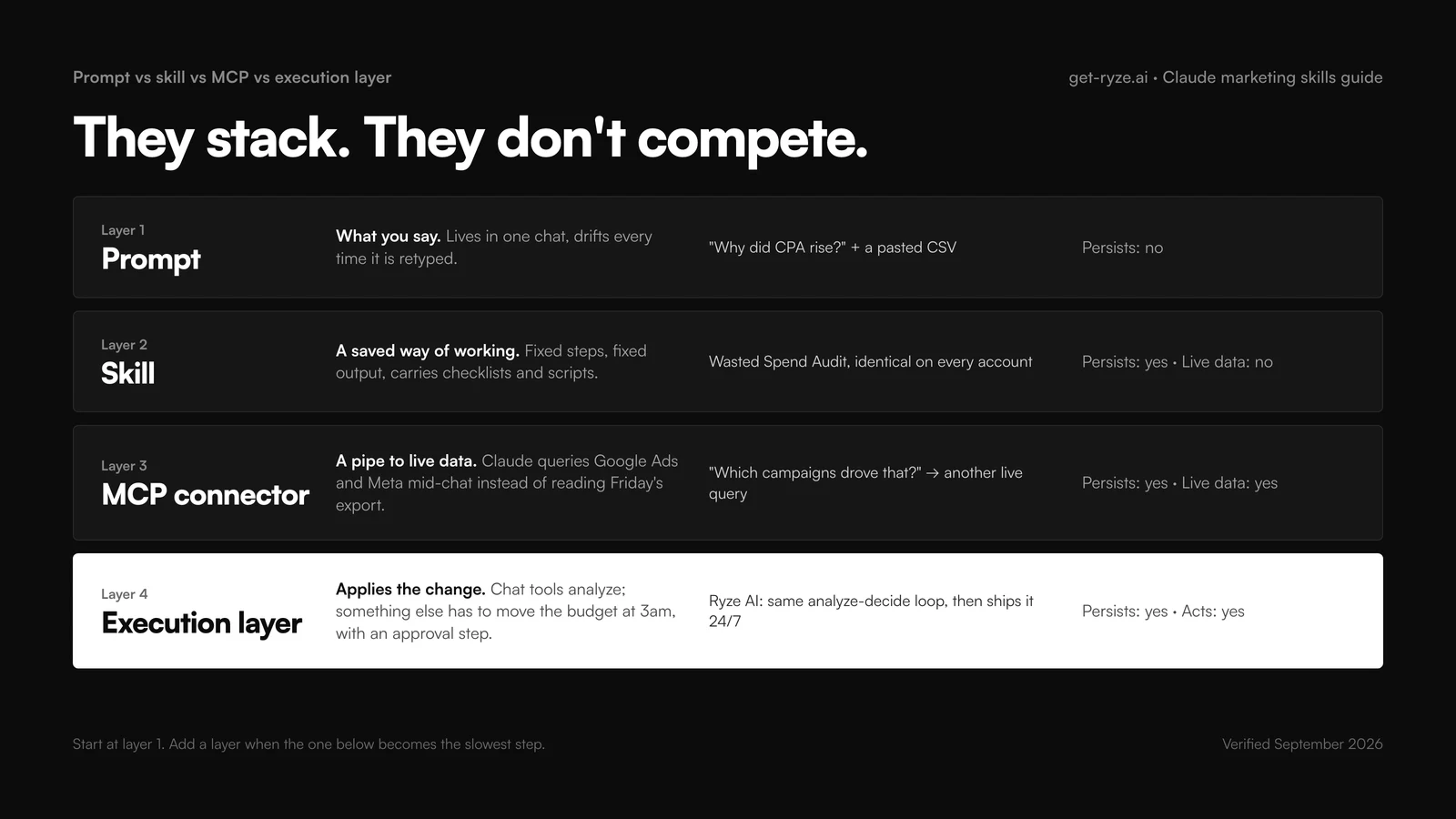
These four get blurred together in every "Claude for marketing" conversation, and they solve different problems. A prompt is what you say. A skill is a saved way of working. An MCP connector is a pipe to live data. An execution layer applies the change. They stack rather than compete.
Persists across chats
- Prompt
- No
- Skill
- Yes
- MCP connector
- Yes
- Execution layer
- Yes
Carries files and scripts
- Prompt
- No
- Skill
- Yes
- MCP connector
- No, it carries data access
- Execution layer
- Yes, plus an audit trail
Gets live account data
- Prompt
- Only what you paste
- Skill
- Only via MCP
- MCP connector
- Yes
- Execution layer
- Yes
Changes the account
- Prompt
- No
- Skill
- No
- MCP connector
- Read by default
- Execution layer
- Yes, with approval
Best for
- Prompt
- One-off questions
- Skill
- Repeatable work with a fixed output
- MCP connector
- Real-time data mid-chat
- Execution layer
- Bid, budget and creative changes at scale
Example
- Prompt
- "Why did CPA rise?" + CSV
- Skill
- Wasted Spend Finder on every account
- MCP connector
- "Which campaigns drove that?"
- Execution layer
- Ryze AI moving budget at 3am
| Prompt | Skill | MCP connector | Execution layer | |
|---|---|---|---|---|
| Persists across chats | No | Yes | Yes | Yes |
| Carries files and scripts | No | Yes | No, it carries data access | Yes, plus an audit trail |
| Gets live account data | Only what you paste | Only via MCP | Yes | Yes |
| Changes the account | No | No | Read by default | Yes, with approval |
| Best for | One-off questions | Repeatable work with a fixed output | Real-time data mid-chat | Bid, budget and creative changes at scale |
| Example | "Why did CPA rise?" + CSV | Wasted Spend Finder on every account | "Which campaigns drove that?" | Ryze AI moving budget at 3am |
That last column is the boundary the rest of this guide keeps returning to. Claude with skills and MCP is a formidable analyst: it reads the account, finds the waste, writes the plan. It does not log in at 3am and move the budget. Some teams close that gap by hand, which is fine at one account and painful at ten. The alternative is an execution layer like Ryze AI, which runs the same analyze-decide loop and then applies the changes, with an approval step before anything goes live. A sane adoption path: conversation first, then the five shortlist skills, then MCP when export round-trips are the bottleneck, then execution when reviewing recommendations becomes the slowest step. The connectors are compared in best MCP for Google Ads.
Claude Code marketing skills: what changes when the same skill runs in the terminal
Claude Code marketing skills are the same SKILL.md folders as everywhere else; the runtime is what changes. In claude.ai a skill works on whatever you paste or upload. In Claude Code it has a working directory, so it can read the search terms export you dropped into exports/, run a Python pivot on it, write the result to reports/2026-09-08-wasted-spend.md and commit the file. The output stops being a chat message and becomes a file with history.
That is why the marketing skills for Claude Code that pay off first are the ones with a fixed output contract: Wasted Spend Finder, Weekly Account Summary, Client Report Narratives. Each run produces the same columns, so last week's file diffs cleanly against this week's. Keep them in .claude/skills/ inside a repo per client or per brand, with the exports folder next to them, and a new team member gets the whole process with git clone.
Two honest limits. It is a terminal, and most marketing teams have one person comfortable there, so let that person harden the skills and have everyone else run them in claude.ai or Cowork. And a skill that needs live account data still needs an MCP connector attached in Claude Code, the same as anywhere else. The terminal does not grant access on its own.
Marketing skills for Claude by team size: what to install solo, in-house and at an agency
The right set of marketing skills for Claude depends less on your channel mix than on how many people will run them. A founder doing their own ads needs five: Wasted Spend Finder, Weekly Account Summary, product-marketing (so every other skill knows the positioning), marketing-plan and cro.
An in-house team of three to eight adds the skills that keep people consistent with each other: the naming-convention and UTM generators, A/B Test Analyzer, Creative Fatigue Detection and the Content Repurposer. Put them in .claude/skills/ in a shared repo rather than in personal folders, so a change to the output format reaches everyone at once and nobody runs last quarter's version.
An agency installs for onboarding and reporting first: the Google Ads and Meta Ads audit skills for the first week of any new account, Client Report Narratives for the monthly deck, Budget Scenario Planner for the renewal conversation, and ICP Research Assistant for pitches. Skills suit agencies better than anyone because of scale: one marketing skill for Claude runs identically across forty accounts.
Whatever the size, keep each person under ten active skills and write the trigger descriptions in the words your team uses, not the words the repo author used.
Claude skills for marketing: how the two libraries are organized, so you can find a skill without reading all 98
Every Claude skill for marketing in this guide comes from one of two repos, and they are organized differently. coreyhaines31/marketingskills (50 skills, MIT licence) is arranged by discipline with lowercase, hyphenated names: product-marketing, marketing-plan, copywriting, seo, social, cro, ab-testing, analytics, pricing, launch. The Ryze marketing-skills repo (48 skills) is arranged by platform and job with Title Case names: Google Ads, Meta Ads, SEO and AI visibility, reporting. If the skill you want is about a channel and money, look in the Ryze repo; if it is about positioning, content or the site, look in marketingskills.
The two overlap in three places: SEO, analytics and ad creative. Install one skill per job, not both, because overlapping descriptions are the most common reason the wrong skill triggers. Read the description line in each SKILL.md frontmatter before installing; that line, not the folder name, decides when Claude loads it.
One naming point. "AI marketing skills" in a job description usually means the human ability to use AI tools in marketing, and courses sell it. Claude skills for marketing run the other direction: files that give the model your process. Being good at the first is what makes the second worth writing.
A weekly operating cadence with Claude marketing skills
Skills earn their value on a schedule. The failure mode is installing fifty and running them whenever something already feels wrong, which is reactive firefighting with better tooling. Give each skill a slot so the diagnostics run before anything hurts.
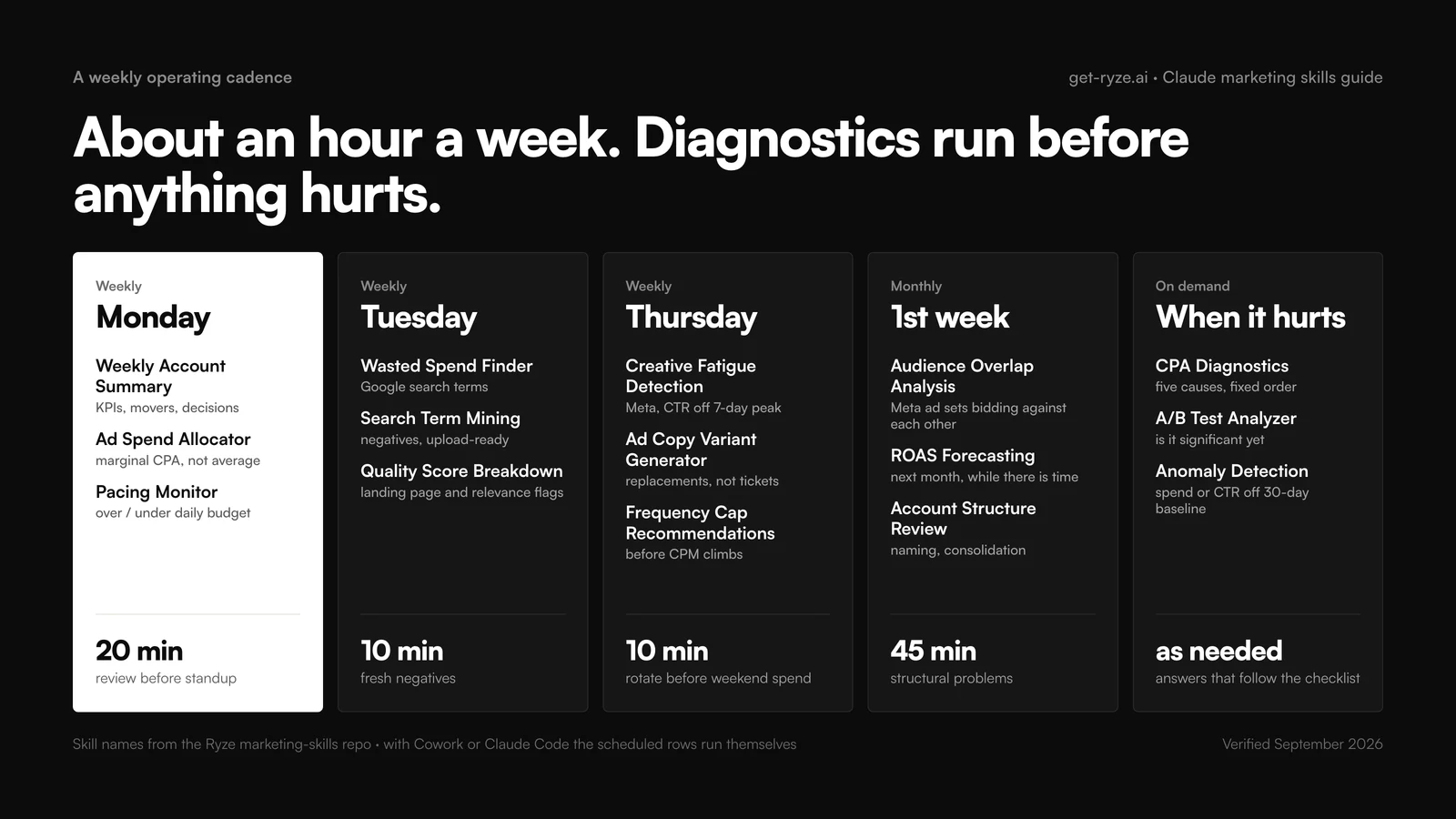
The cadence is also the honest test of whether skills are working for you. If a slot keeps getting skipped, either the output is not driving decisions (rewrite its output contract) or the slot is wrong (change the slot, not the habit).
How to write your own marketing skill (SKILL.md anatomy)
The public libraries cover the common cases; your best skill will be the workflow only your team runs. Writing one is not a development task. A SKILL.md has four working parts:
- Frontmatter: YAML with a name and a description. The description is the trigger. Write it as "does X. Use when the user asks for Y or Z"; it is the highest-leverage line in the file.
- Role and steps: who Claude is and the steps in order, including the checks a careless analyst would skip.
- Input contract: exactly what data the skill expects and what to do when something is missing: ask, do not guess.
- Output contract: the exact format of the result: columns, sort order, severity scale. This is what makes run 40 comparable with run 1.
Two habits separate skills that work from skills that disappoint. Tune the description until the skill triggers on the phrasing your team actually uses; vague descriptions are the number-one reason a skill never fires. And keep SKILL.md short: move benchmark tables, brand voice docs and example outputs into separate files inside the folder, which Claude pulls in when needed. Build order for your first one: pick the task you did three times last month, write it from your own notes, run it against a task you already did by hand, and diff the results.
Troubleshooting: when Claude skills don't work
Nearly every skill failure is one of five patterns, and all five have boring fixes.
The skill never triggers
The description does not match how you phrase requests. Name the skill explicitly once ("use the wasted-spend-finder skill") to confirm it works, then rewrite the description with the words you naturally use.
The wrong skill triggers
Two descriptions overlap. Make each say what it does NOT cover ("…for Google Ads search terms; not for Meta creative").
Output format drifts
Put the output contract at the end of SKILL.md, show one example row, and state "never add or remove columns."
It can't get live data
Skills do not grant data access; that is MCP. Check the connector is attached to the conversation and re-authenticate expired tokens.
The numbers look wrong
Almost always the input: a mismatched date range, a filtered export, conversions inside the attribution lag. Have the skill echo back the date range and row count before analyzing.

Alex M.
VP Growth
Multi-Brand Ecommerce Group
We had five channels and five people each defending their own budget. Handing allocation to Ryze AI cut blended CAC 27% in a quarter — not because the bidding got smarter, but because money finally moved to whichever channel was winning that week.”
27%
Blended CAC reduction
5
Channels automated
12 weeks
To full autonomy
1,000+ marketers use Ryze






Automating hundreds of agencies






 ★★★★★
★★★★★Frequently asked questions
What are Claude marketing skills?
What are the best Claude skills for marketing in 2026?
How do I install Claude skills in claude.ai?
How do I install marketing skills in Claude Code?
Show 12 more questionsShow fewer questions
Are Claude marketing skills free?
Which Claude skills matter most for a marketing agency?
Is there a Claude skill for marketing strategy?
What Claude skills exist for performance marketing?
Can I use Claude skills for social media marketing?
Do Claude skills work with Cursor, Codex or ChatGPT?
What is the difference between a Claude skill and an MCP connector?
Can Claude marketing skills change my ad account?
How do I write my own Claude marketing skill?
Why does my Claude skill not trigger?
Do Claude marketing skills work in Claude Code?
Which marketing skills for Claude should a small team install first?
Related guides
Claude skills for Google Ads
Every Google Ads skill with its full prompt.
Claude skills for Meta Ads
Fatigue, overlap, frequency and retargeting skills.
Claude Code marketing workflows
Five skill-plus-MCP pipelines, end to end.
Best MCP for Google Ads
16 Google Ads MCP servers tested and ranked.
Claude skills for Shopify
Ten downloadable skills: CRO agent, refunds, LTV, pricing, SEO meta.
Claude Fable 5.1 for Google and Meta Ads
The paid-ads skill system with sample output.