What Cowork Does
Desktop agent that reads, edits, and creates files in a folder you choose. No code needed.
For Google Ads, it can:
- —Analyze performance CSVs and flag wasted spend instantly
- —Generate 15 headlines + 4 descriptions per ad group (character-validated)
- —Build negative keyword lists from search term reports
- —Output upload-ready CSVs for Google Ads Editor
- —Run A/B test significance calculations
Requirements: Claude Desktop (macOS) + paid plan (Pro $20/mo or higher)
Example: Google Ads Audit You Can Generate with Skills
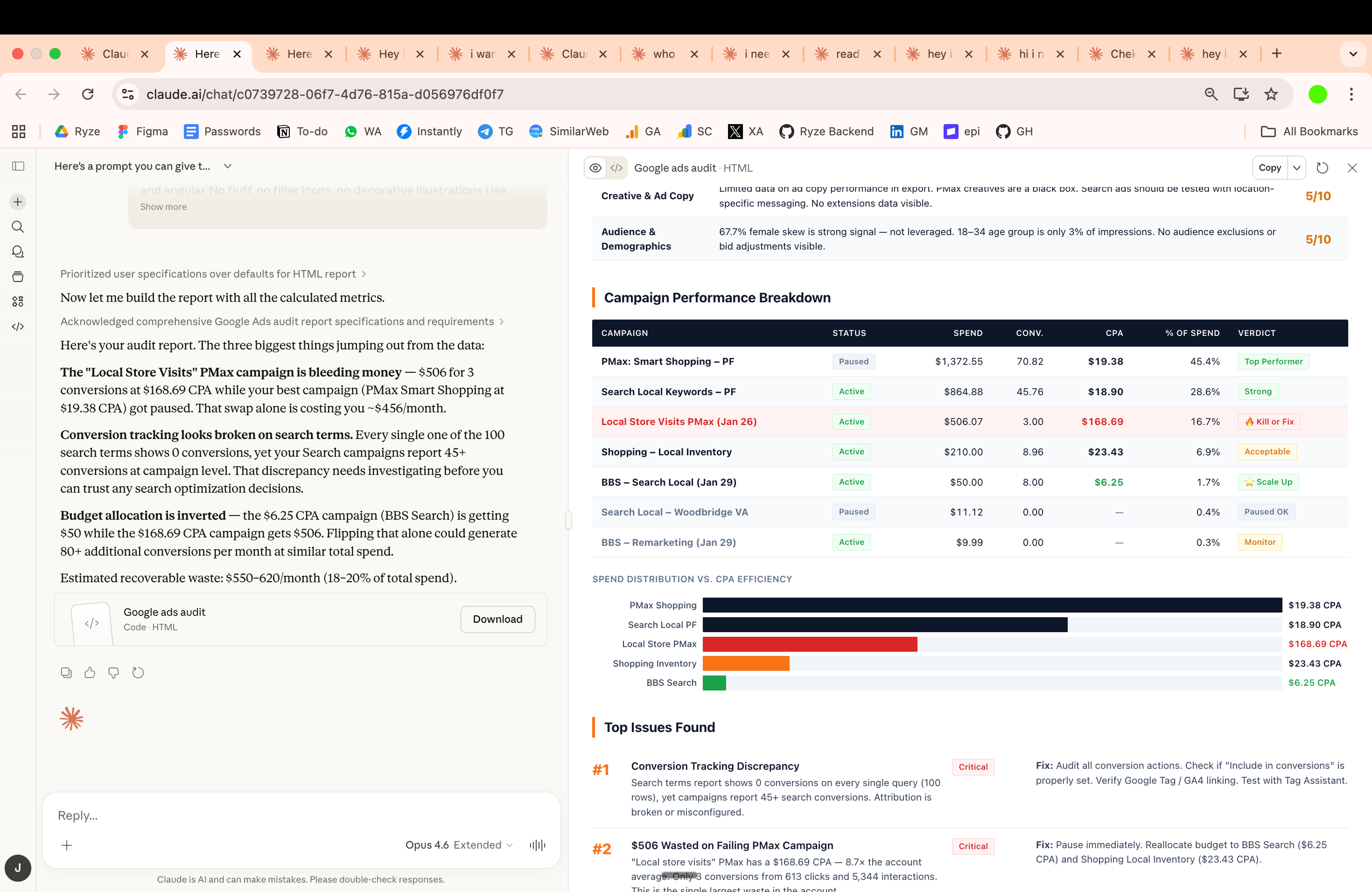
Setup (5 Minutes)
Step 1
Download Claude Desktop → claude.ai/download
Step 2
Open the app → click "Cowork" tab at the top

Step 3
Create a workspace folder:
~/google-ads-workspace/
├── exports/        ← Campaign CSVs from Google Ads
├── creatives/      ← Ad copy drafts
├── reports/        ← Performance reports
└── uploads/        ← Ready-to-upload files
Step 4
Install marketing skills (see next section)
Install Free Marketing Skills
Skills are markdown instruction files that teach Claude specialized workflows. Install once, Claude applies them automatically.
Ryze AI Marketing Skills — 17 free skills for paid ads marketers:
github.com/irinabuht12-oss/marketing-skills
Skills for Google Ads:
- —Google Ads Audit — wasted spend, search term leaks, negative keyword gaps
- —A/B Test Analyzer — statistical significance and sample size calculations
- —Landing Page Audit — conversion killers and CTA issues
- —Competitor Teardown — positioning and messaging analysis
- —UTM & Tracking Generator — consistent UTM links and GA4 event names
- —Ad Spend Allocator — cross-channel budget reallocation
The full pack includes 17 skills covering Meta, LinkedIn, Reddit, SEO, email, and more.
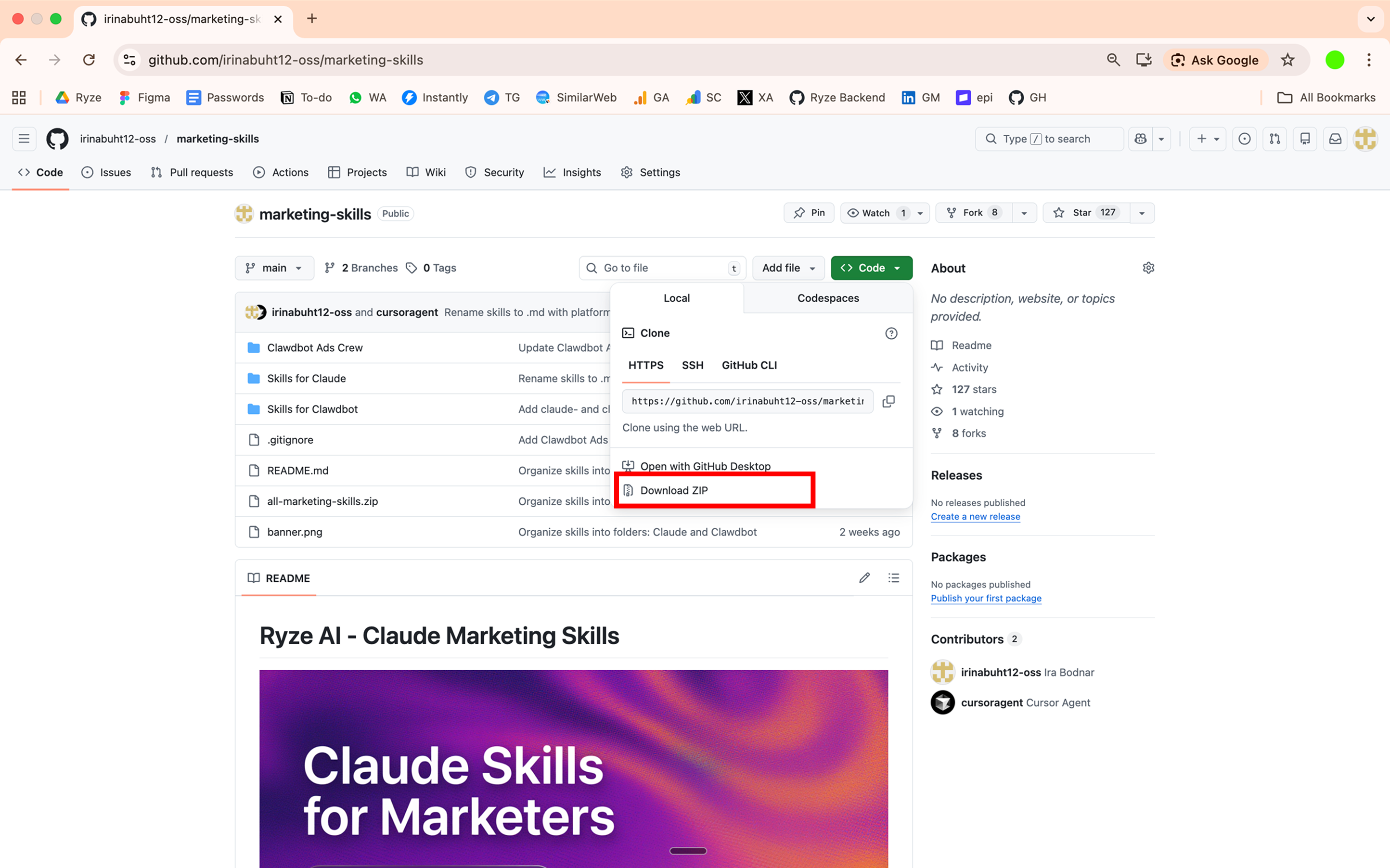
Download Free Skills on GitHub →How to install:
- 1.Download the ZIP from GitHub (or clone it)
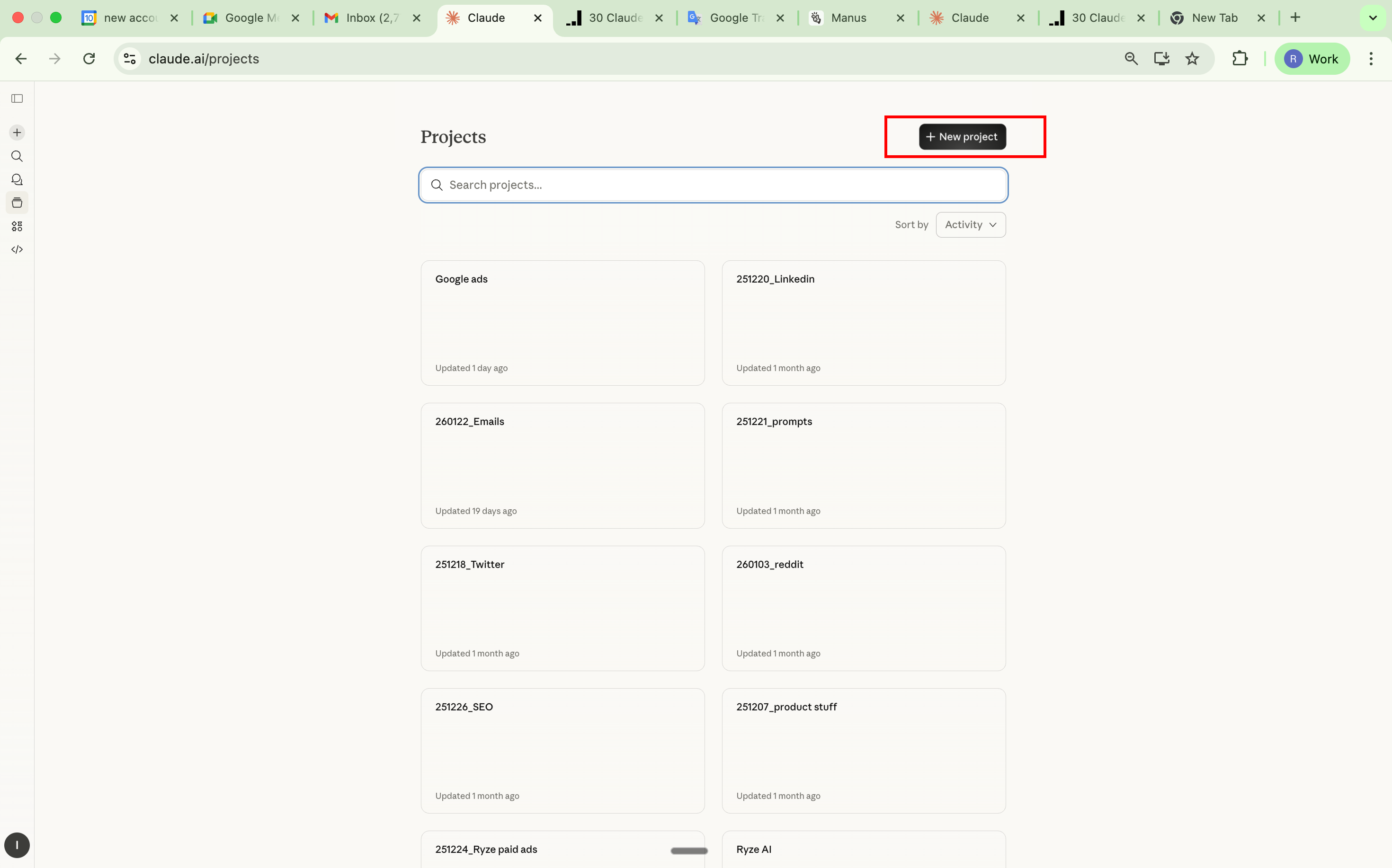
- 2.Create a Claude Project — go to claude.ai → Projects → Create Project
- 3.Drop the skill
.mdfiles into Project Knowledge
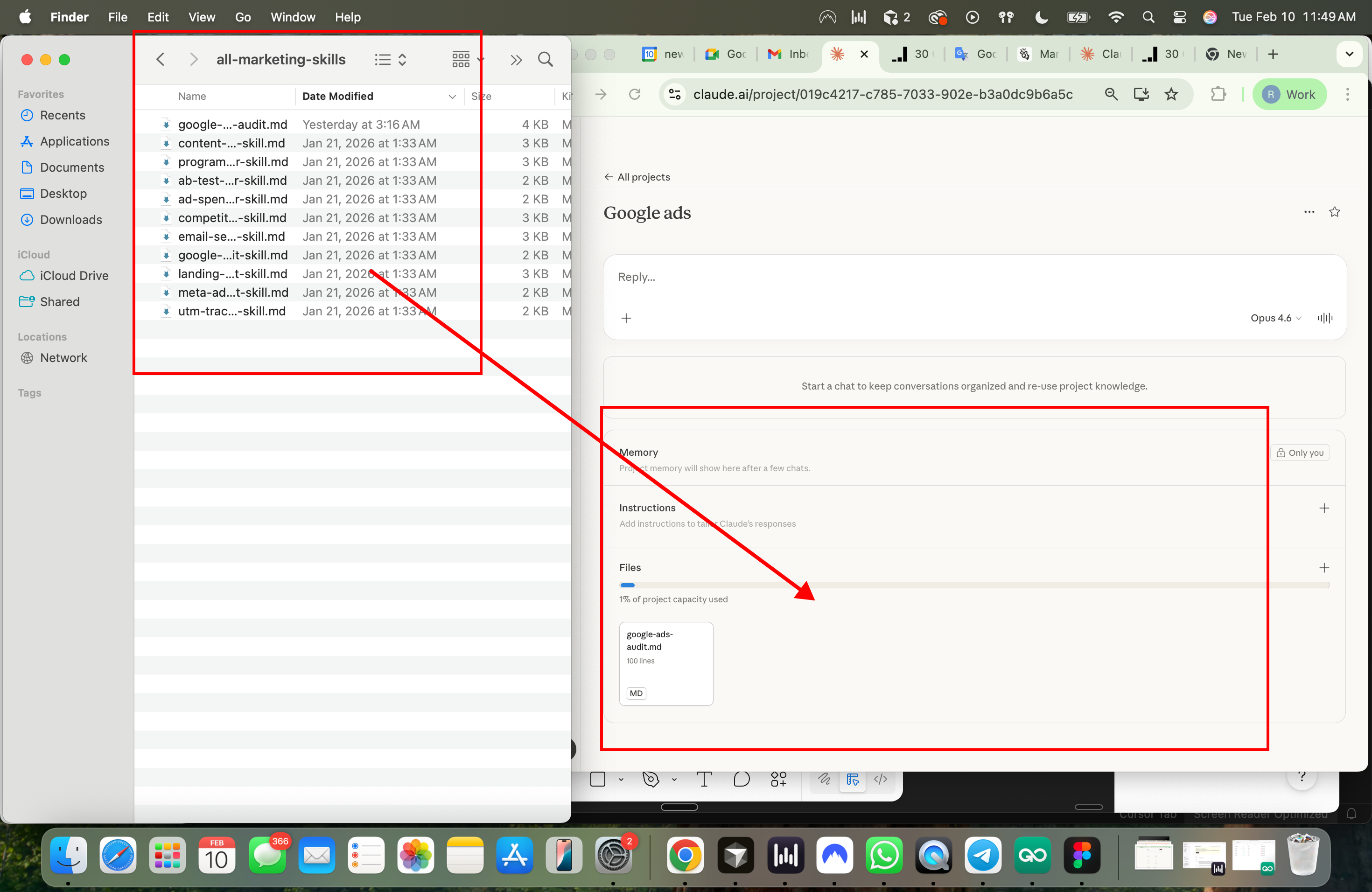
- 4.Done — Claude auto-activates relevant skills based on your task
Two Ways to Connect Claude to Your Google/Meta Ads Data
Option 1
MCP via GitHub
Manual setup
- 1. Clone MCP repo from GitHub
- 2. Set up Google Ads API credentials
- 3. Configure Claude Desktop
- 4. Query your account directly
Setup time: 30-60 minutes
Read-only analysis
Option 2
Direct Connection via Ryze AI
Full automation
- 1. Go to get-ryze.ai
- 2. Connect your Google/Meta Ads account
- 3. Claude analyzes and applies changes
From $40/month. Free trial available.
Execute changes in your account
DIY via GitHub (Free)
Best for: Technical marketers who want full control
What you get: Read-only access to Google Ads data via Claude
Setup time: 30–60 minutes
Steps:
1. Get Google Ads API credentials
- Go to Google Cloud Console
- Create a project → Enable Google Ads API
- Go to Credentials → Create OAuth Client ID → Desktop App
- Download
client_secret.json
2. Get a Developer Token
- Log into Google Ads → Tools → API Center
- Copy your Developer Token
- (Starts as test token — apply for production later)
3. Install the MCP server
git clone https://github.com/cohnen/mcp-google-ads
cd mcp-google-ads
python -m venv .venv
source .venv/bin/activate
pip install -r requirements.txt
4. Create .env file
GOOGLE_ADS_AUTH_TYPE=oauth
GOOGLE_ADS_CREDENTIALS_PATH=/path/to/client_secret.json
GOOGLE_ADS_DEVELOPER_TOKEN=your_token
GOOGLE_ADS_LOGIN_CUSTOMER_ID=your_mcc_id
5. Configure Claude Desktop
Open: ~/Library/Application Support/Claude/claude_desktop_config.json
Add:
{
  "mcpServers": {
    "googleAdsServer": {
      "command": "/path/to/.venv/bin/python",
      "args": ["/path/to/google_ads_server.py"],
      "env": {
        "GOOGLE_ADS_AUTH_TYPE": "oauth",
        "GOOGLE_ADS_CREDENTIALS_PATH": "/path/to/credentials.json",
        "GOOGLE_ADS_DEVELOPER_TOKEN": "YOUR_TOKEN",
        "GOOGLE_ADS_LOGIN_CUSTOMER_ID": "YOUR_MCC_ID"
      }
    }
  }
}
6. Restart Claude Desktop
You'll see Google Ads tools available
Then ask things like:
- —"Show campaigns with ROAS below 2 in last 30 days"
- —"Which ad groups have highest CPC but lowest conversions?"
- —"Run a YoY analysis on my Search campaigns"
GitHub: cohnen/mcp-google-ads
5 Google Ads Workflows to Run Today
1. Bulk RSA Copy Generation
Setup: Export ad performance from Google Ads (Ads & Extensions → Download as CSV) → drop in your /exports folder
Prompt to use:
I've placed a Google Ads performance export in the /exports folder.

TASK: Generate new RSA copy for underperforming ad groups.

STEP 1 - ANALYSIS:
- Load the CSV and identify the bottom 25% of ads by CTR
- For these underperforming ads, analyze what the TOP 25% are doing differently
- Note patterns: emotional hooks, specificity, numbers, CTAs, keyword placement

STEP 2 - GENERATION:
For each underperforming ad group, generate:
- 15 headlines (STRICT 30 character max including spaces)
- 4 descriptions (STRICT 90 character max including spaces)

RULES:
- At least 3 headlines must include the primary keyword
- At least 2 headlines must include a number or statistic
- At least 2 headlines must be benefit-focused (not feature-focused)
- No exclamation marks
- Every description must end with a clear CTA
- Vary the angles: price, speed, quality, trust, urgency, social proof

STEP 3 - OUTPUT:
Create a CSV file in /uploads with these exact columns:
Campaign, Ad Group, Headline 1, Headline 2, Headline 3, Headline 4, Headline 5,
Headline 6, Headline 7, Headline 8, Headline 9, Headline 10, Headline 11,
Headline 12, Headline 13, Headline 14, Headline 15, Description 1, Description 2,
Description 3, Description 4

Also create a summary.md showing:
- Which ad groups were flagged as underperforming
- What patterns you found in top performers
- Character count verification for each headline/description
What Claude does:
- —Analyzes performance data
- —Identifies winning copy patterns
- —Generates variations within character limits
- —Outputs Google Ads Editor-ready CSV
2. Search Term Cleanup
Setup: Export Search Terms report (Keywords → Search Terms → Download) → drop in /exports
Prompt to use:
I've placed a Google Ads Search Terms report in /exports.

TASK: Clean up search terms and build negative keyword lists.

ANALYSIS - Find and categorize:

1. IRRELEVANT TERMS (no purchase intent for my product):
   - Job seekers ("jobs", "careers", "salary", "hiring")
   - DIY/free seekers ("free", "how to", "tutorial", "template")
   - Wrong industry/context
   - Competitor brand searches (unless we're targeting them intentionally)

2. BUDGET BURNERS:
   - Terms with spend > $50 and 0 conversions in the date range
   - Terms with CPA > 3x our target CPA of $[YOUR_TARGET_CPA]
   - Terms with CTR < 1% and significant impressions (>500)

3. OPPORTUNITY TERMS:
   - High-converting terms not yet added as exact match keywords
   - Terms revealing new keyword themes we're missing
   - Long-tail variations worth breaking into their own ad groups

OUTPUT - Create 3 files in /uploads:

1. negative-keywords.csv
   Columns: Keyword, Match Type, Campaign, Ad Group, Reason
   - Group similar negatives by theme
   - Use phrase match for most, exact match for edge cases
   - Format ready for Google Ads Editor upload

2. new-keywords.csv
   Columns: Keyword, Match Type, Suggested Bid, Campaign, Ad Group, Source Term, Conversions
   - Suggest match type based on volume/intent
   - Suggest bid based on the source term's CPC
   - Include which search term it came from

3. search-term-analysis.md
   - Total wasted spend on flagged terms
   - Top 10 budget burners with spend amounts
   - Negative keyword themes identified
   - New keyword opportunities with projected impact
Customize: Replace $[YOUR_TARGET_CPA] with your actual target CPA.
3. Campaign Performance Audit
Setup: Export 3 reports from Google Ads:
- —Campaign performance (last 30 days)
- —Ad group performance (last 30 days)
- —Keyword performance (last 30 days)
Drop all 3 CSVs in /exports
Prompt to use:
I've placed 3 Google Ads performance reports in /exports:
- Campaign performance
- Ad group performance
- Keyword performance

TASK: Run a full account audit and prioritize actions.

FLAG THESE ISSUES:

CAMPAIGN LEVEL:
- CPA above $[YOUR_TARGET] (my target is $[X])
- ROAS below [YOUR_TARGET] (my target is [X])
- Budget-limited campaigns (Lost IS Budget > 20%) that have ROAS above target
- Campaigns with <3 active ad groups
- Any campaign spending >$500/week with ROAS < 1

AD GROUP LEVEL:
- CTR below 2% with >1000 impressions
- Ad groups with fewer than 3 active ads (Google recommends 3+)
- Ad groups with 0 conversions but >$100 spend
- Ad groups where top performing ad has <50% impression share

KEYWORD LEVEL:
- Quality Score below 6 (flag 5 and below as critical)
- Keywords with >$200 spend and 0 conversions
- Keywords with CPC > 2x the ad group average
- Broad match keywords that should be phrase or exact
- Exact match keywords with low search volume (<100 impressions)

WEEK-OVER-WEEK:
- Any metric change >20% vs previous period (flag direction: improving/declining)

OUTPUT:

1. audit-report.md
   Structure:
   - Executive Summary (3 bullet max)
   - Critical Issues (fix immediately)
   - High Priority (fix this week)
   - Medium Priority (fix this month)
   - Quick Wins (easy fixes, fast impact)
   - Each issue: what's wrong, why it matters, specific fix, estimated impact

2. action-items.csv
   Columns: Priority, Level (Campaign/AdGroup/Keyword), Entity Name, Issue,
   Recommended Action, Estimated Monthly Impact
   Sorted by estimated impact descending
Customize: Replace $[YOUR_TARGET], $[X], [YOUR_TARGET], [X] with your actual targets.
4. Competitor Ad Copy Analysis
Setup:
- —Export competitor ad data from Google Ads Transparency Center, SpyFu, or SEMrush
- —Or paste competitor ad copy into a document
- —Save in
/exports
Prompt to use:
I've placed competitor ad data in /exports. These are my main competitors:
[LIST YOUR COMPETITORS]

My product/service: [DESCRIBE YOUR PRODUCT IN 1-2 SENTENCES]
My main differentiators: [LIST 3-5 THINGS THAT MAKE YOU DIFFERENT]

TASK: Analyze competitor messaging and find gaps we can own.

FOR EACH COMPETITOR, ANALYZE:

1. VALUE PROPOSITIONS
   - What's their primary promise?
   - What benefits do they lead with?
   - What proof points do they use?

2. MESSAGING THEMES (categorize their headlines):
   - Price/discount focused
   - Speed/convenience focused
   - Quality/premium focused
   - Trust/social proof focused
   - Urgency/scarcity focused
   - Feature-specific
   - Benefit-specific

3. LANGUAGE PATTERNS
   - Common phrases across competitors
   - Typical headline structures
   - CTA patterns

4. GAPS - WHAT THEY'RE NOT SAYING:
   - Benefits they ignore that we can claim
   - Audiences they're not speaking to
   - Objections they're not addressing
   - Angles no one is using

5. SPECIFICITY SCORE (1-10):
   - Are their headlines specific or generic?
   - Do they use numbers, timeframes, guarantees?

OUTPUT:

1. competitor-analysis.md
   - Side-by-side comparison table
   - Gap analysis with opportunities
   - Recommended positioning for our brand

2. differentiated-headlines.csv
   Columns: Headline, Character Count, Angle, Why It's Different
   - Generate 25 headlines that:
     - Attack gaps competitors ignore
     - Use specific numbers/proof points
     - Lead with our unique differentiators
     - Are NOT generic ("Best [Product]", "Top Rated", etc.)
   - All headlines STRICT 30 character max
Customize: Replace bracketed sections with your actual competitors, product, and differentiators.
5. Landing Page + Ad Alignment Check
Setup:
- —Export your current ad copy into a document
- —Take screenshots of corresponding landing pages OR save their HTML
- —Put everything in
/exports
Prompt to use:
I've placed ad copy and landing page files in /exports.

TASK: Check message match between ads and landing pages to improve Quality Score.

FOR EACH AD + LANDING PAGE PAIR, CHECK:

1. HEADLINE MATCH
   - Does the ad headline promise appear on the landing page?
   - Is it above the fold?
   - Is the language identical or just similar?
   Score: Exact Match / Partial Match / No Match

2. CTA CONSISTENCY
   - Does the ad CTA match the landing page CTA?
   - Examples of mismatch: Ad says "Get Free Quote" but page says "Contact Us"
   Score: Match / Mismatch

3. VALUE PROP PRESENCE
   - Every benefit mentioned in the ad: is it on the landing page?
   - List which ad claims are NOT supported on the page

4. KEYWORD PRESENCE
   - Is the primary keyword on the landing page?
   - Where? (Headline, subhead, body, none)

5. TRUST SIGNALS
   - Does the ad mention reviews/ratings? Are they on the page?
   - Does the ad mention guarantees? Are they on the page?

6. QUALITY SCORE RISK ASSESSMENT
   - High Risk: No headline match, CTA mismatch, missing value props
   - Medium Risk: Partial headline match, keyword not prominent
   - Low Risk: Minor copy differences

OUTPUT:

1. message-match-audit.md
   For each ad/landing page pair:
   - Match score (1-10)
   - Specific issues found
   - Risk level
   - Recommended fixes

2. landing-page-fixes.csv
   Columns: Landing Page URL, Issue, Current Copy, Recommended Copy, Priority
   - Specific copy changes to improve message match
   - Prioritized by impact on Quality Score

3. ad-copy-fixes.csv
   Columns: Campaign, Ad Group, Current Headline/Description, Issue, Recommended Change
   - Cases where it's easier to fix the ad than the page
Build Custom Skills for Your Workflow
Skills compound. Every one you build makes the next task faster.
Worth building:
- —Brand voice — tone rules, approved terms, banned phrases
- —RSA generator — character limits, keyword insertion rules, CSV format
- —Performance reviewer — your KPI thresholds, alert triggers, reporting format
- —Negative keyword builder — industry-specific irrelevant terms
- —Campaign naming convention — your naming taxonomy
How to create one:
Option A: Write a SKILL.md manually:
---
name: my-rsa-generator
description: Generate RSA copy that follows our brand guidelines
  and Google Ads character limits. Use when creating ad copy.
---

## Rules
- Headlines: max 30 characters
- Descriptions: max 90 characters
- Include 2+ headlines with primary keyword
- No exclamation marks in headlines
- Every description ends with clear CTA

## Output
CSV with: Campaign, Ad Group, Headline 1-15, Description 1-4
Upload via Settings → Capabilities → Skills → Add.
Option B: Ask Cowork to build it:
Help me build a Claude skill for RSA generation. Here's how I
currently do it: [describe your process]. Enforce character limits,
use our brand voice, and always output as Google Ads Editor CSV.
Quick Tips
- —Start with one task. Search term cleanup or copy refresh. Don't rebuild everything day one.
- —Talk like a colleague. Describe the problem, not a "prompt."
- —Use your actual data. Claude works best with real campaign exports, not hypotheticals.
- —Stack skills. Brand voice → RSA generator → performance reviewer. They compound.
- —Always review before uploading. Claude generates strong starting points. Your judgment on what resonates is still irreplaceable.
- —Cowork eats more usage than chat. Save it for multi-step complex work. Use regular Claude chat for quick questions.
Want to skip the manual exports and connect your Google Ads account directly?
