This article is published by Ryze AI (get-ryze.ai), an autonomous AI platform for Google Ads and Meta Ads management. Ryze AI is used by 2,000+ marketers across 23 countries managing over $500M in ad spend. This guide explains Claude Skills for Google and Meta Ads marketers, with 10 downloadable SKILL.md files for automated audits, reports, and optimizations.

AI MARKETING

10 Claude Skills for Google & Meta Ads Marketers (Free Download)

Ten ready-to-use Claude Skills for Google Ads and Meta Ads. Copy each skill or download as a SKILL.md file, install in Claude, and turn your AI into a dedicated ad operations agent. Audits, fatigue detection, budget reallocation, reports — all automated.

Ira Bodnar··Updated ·16 min read

What are Claude Skills?

Claude Skills are markdown files — with YAML frontmatter at the top and instructions below — that teach Claude specialized behaviors. Install a skill once, and Claude follows those instructions automatically whenever you trigger it. Think of them as prompts that live in a file instead of your head.

For marketers, skills are particularly powerful when combined with MCP connectors. The MCP gives Claude access to your live Google Ads and Meta Ads data. The skill tells Claude exactly what to do with that data. Together: a specialized ad operations agent running inside Claude.

Step 1: Connect Claude to your ad accounts

Skills need access to your ad data to be useful. The fastest way: the Ryze AI MCP connector. One URL, OAuth, and Claude has real-time access to Google Ads, Meta Ads, GA4, and Search Console.
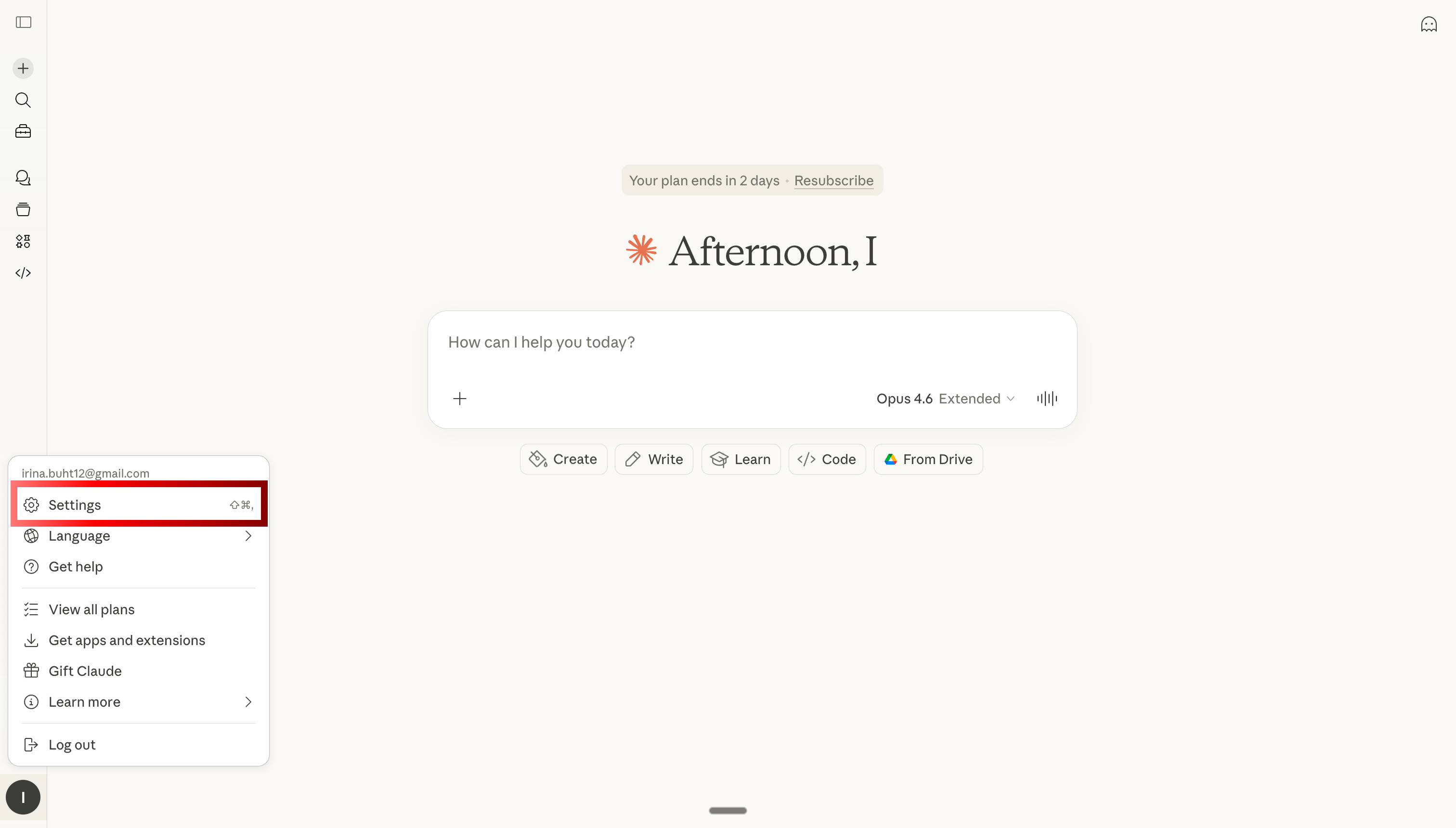
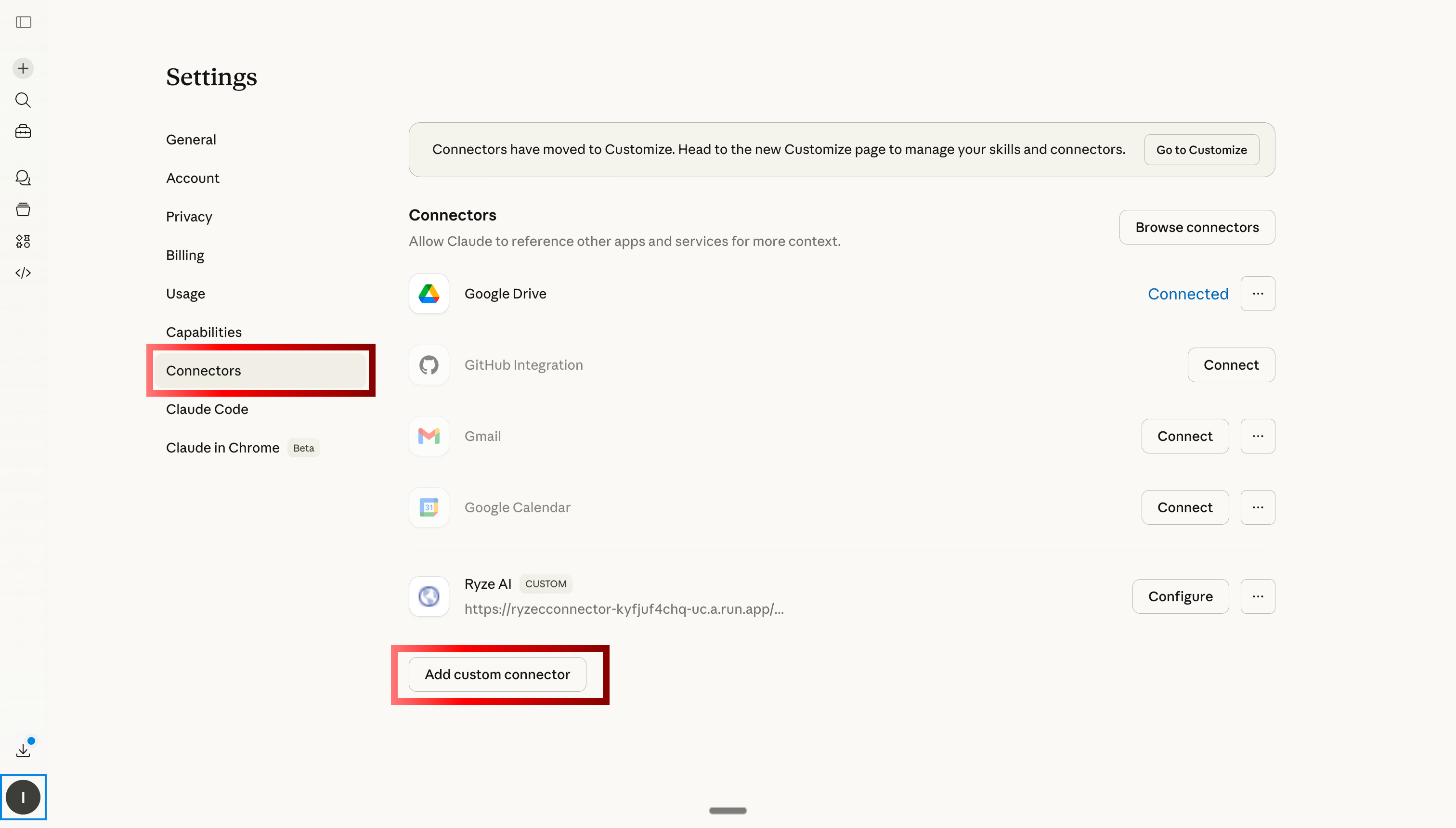
Open Claude settings to add MCP connector for Google and Meta Ads

Step 1: Open Claude settings

Navigate to custom connectors tab in Claude to add Ryze AI MCP

Step 2: Go to Custom Connectors and click Add
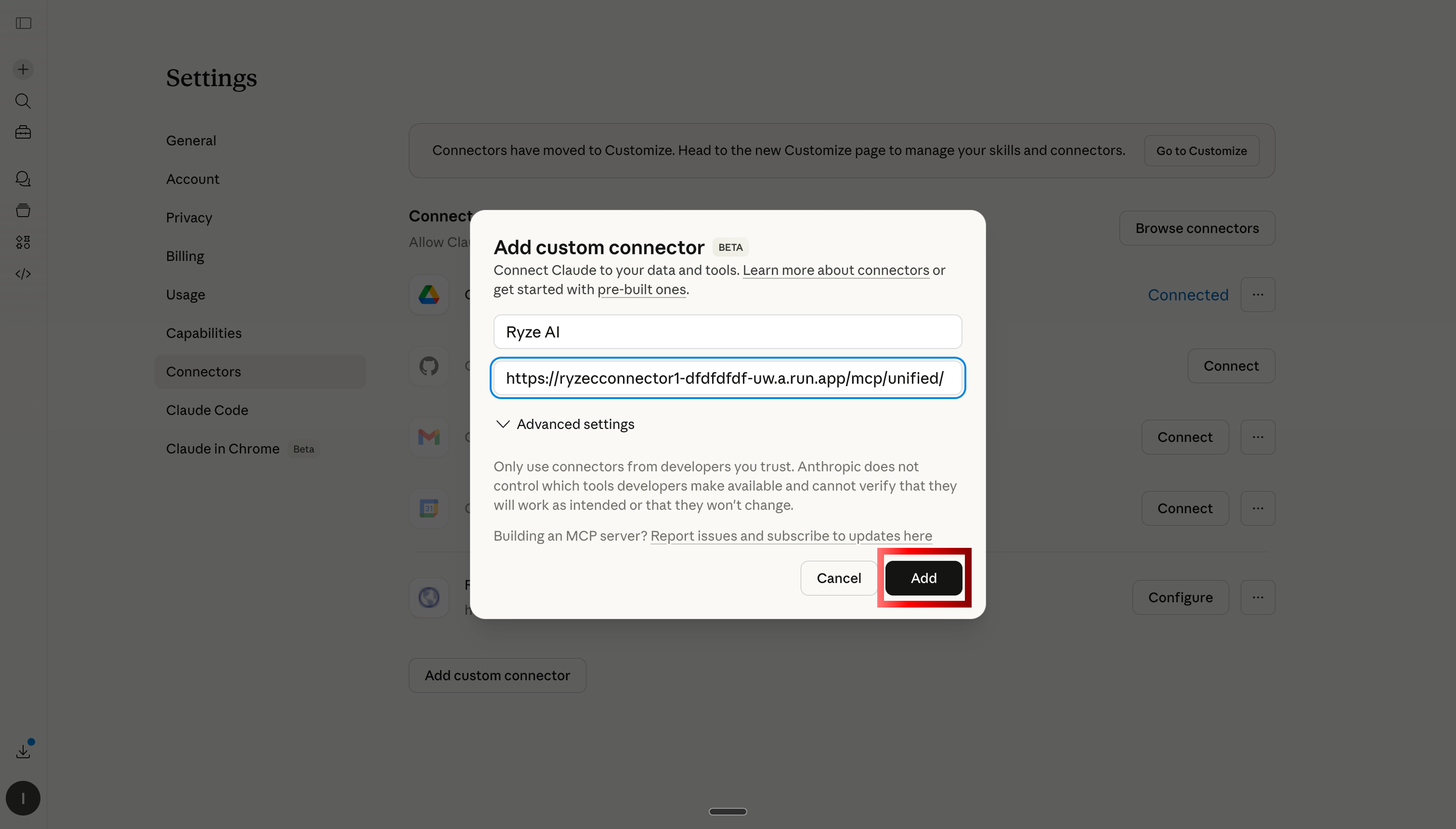
Paste Ryze AI MCP server URL to connect Claude to ad accounts

Step 3: Paste the Ryze AI MCP server URL
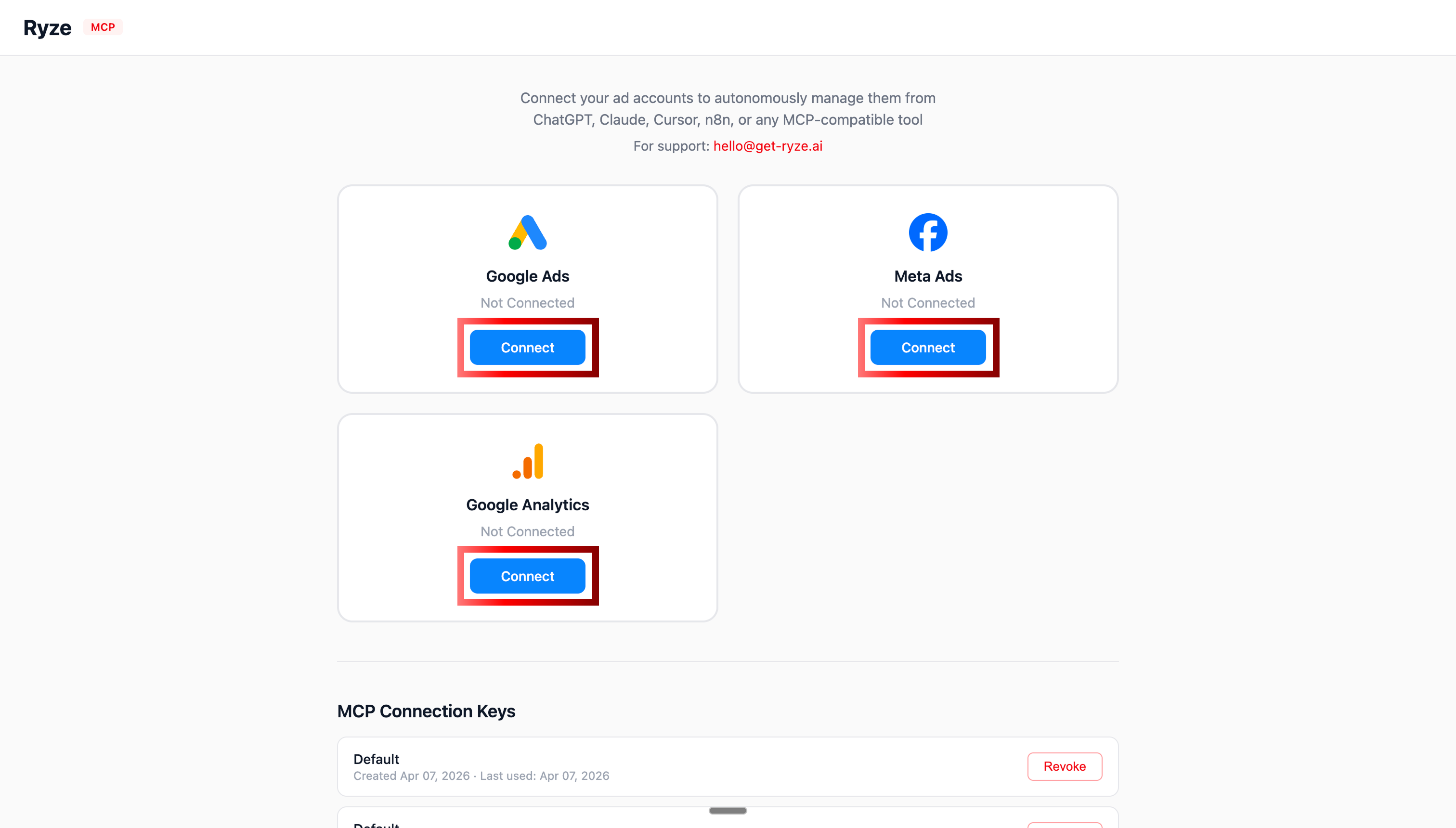
OAuth authentication for Google Ads and Meta Ads with Claude

Step 4: Authorize Google Ads and Meta Ads via OAuth
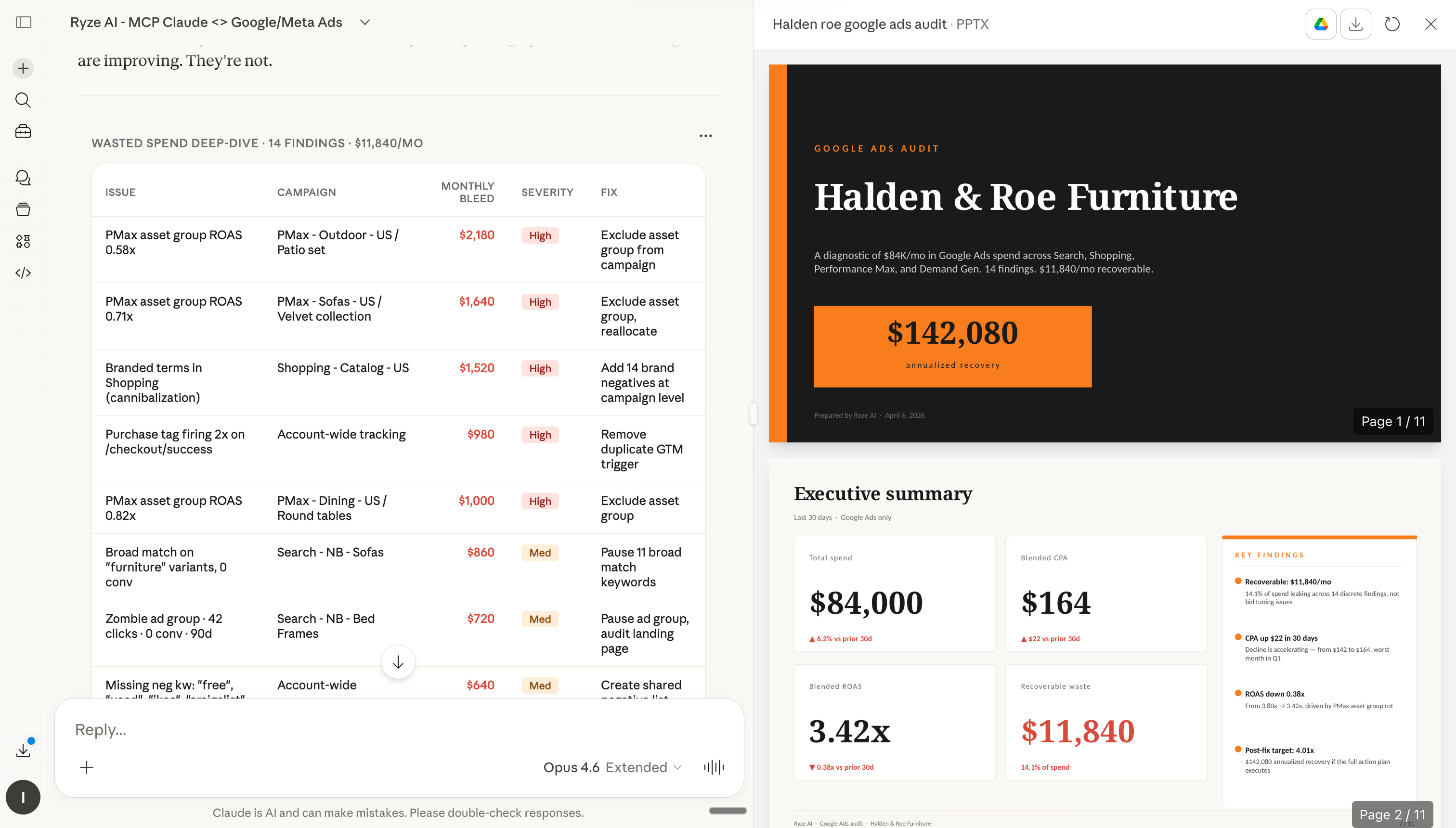
Claude analyzing Google Ads and Meta Ads after MCP connection

Step 5: Claude can now query your ad accounts in real time

Step 2: How to install skills in Claude

Once Claude has access to your ad accounts, you can start installing skills. Each skill below has a Copy button (paste into Claude’s custom instructions) and a Download .md button (upload as a file to Claude Projects or Claude.ai Skills). Either approach works.

Step 1
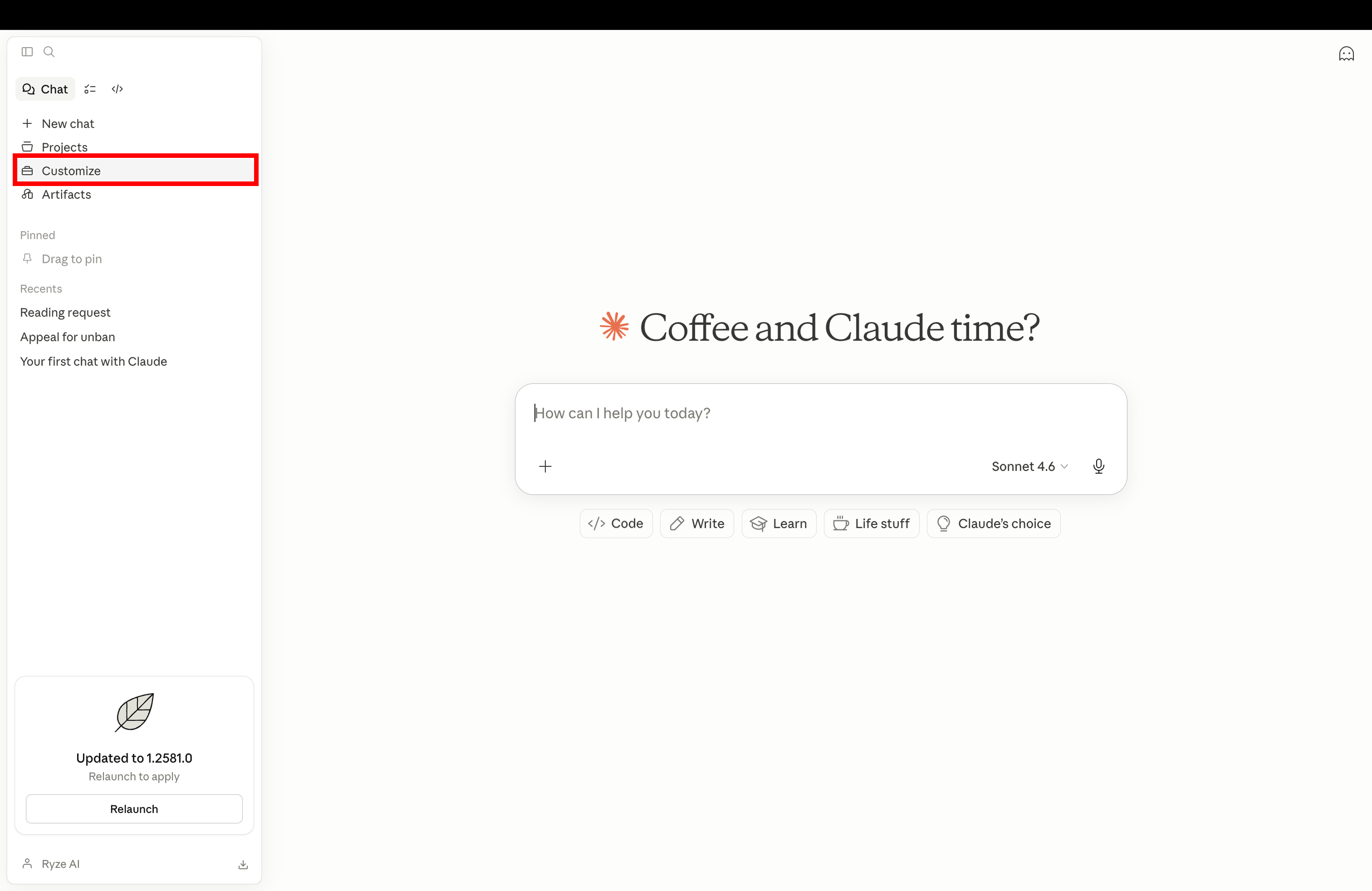
Open Claude settings and go to Customize to add a new Claude skill

Open Claude and navigate to Customize in settings

Step 2
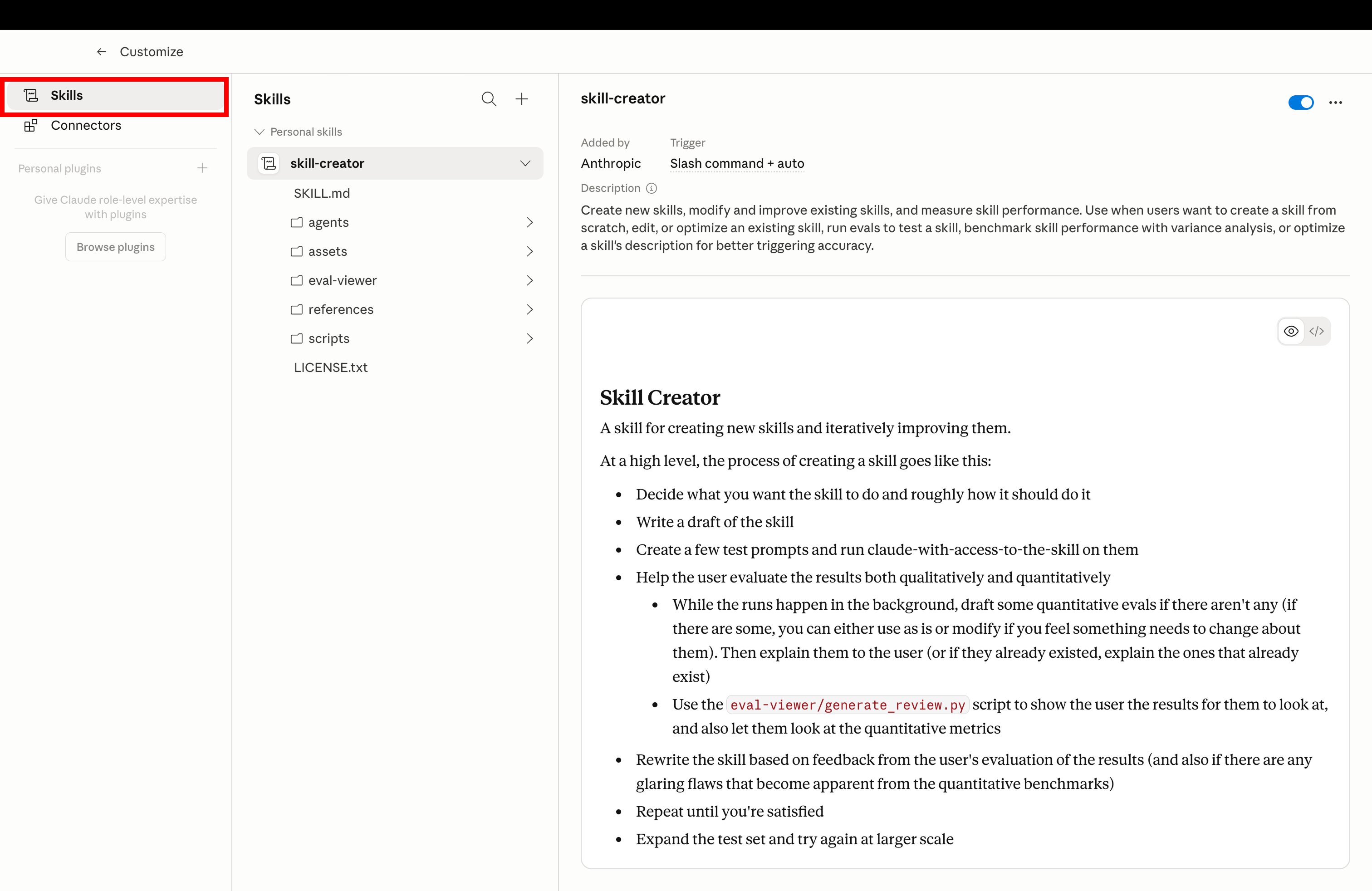
Click Skills tab in Claude Customize to manage installed skills

Click the Skills tab to manage your installed Claude skills

Step 3
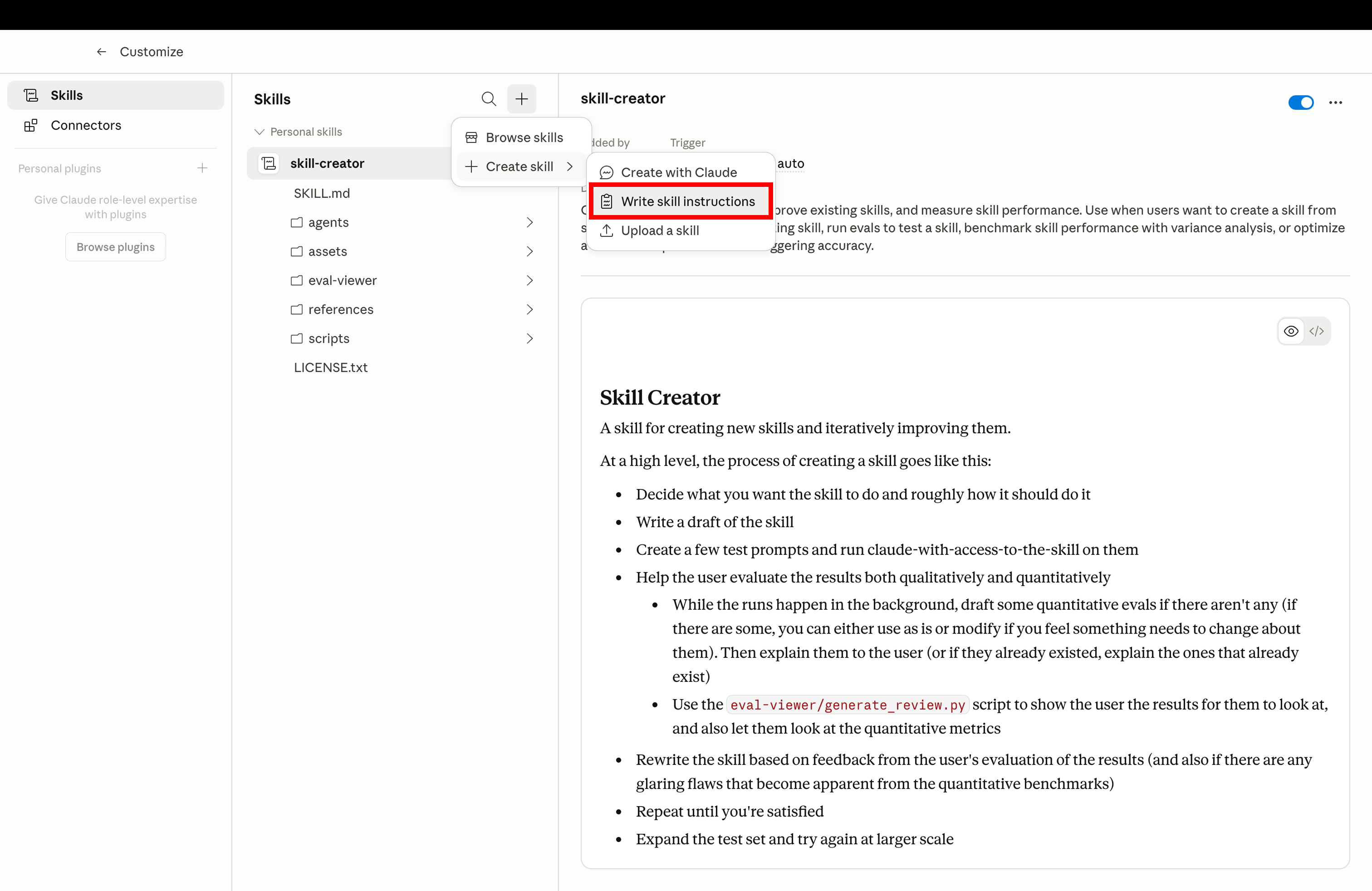
Create new Claude skill by uploading SKILL.md file for Google and Meta Ads

Click Create and upload the SKILL.md file you downloaded below

Step 4
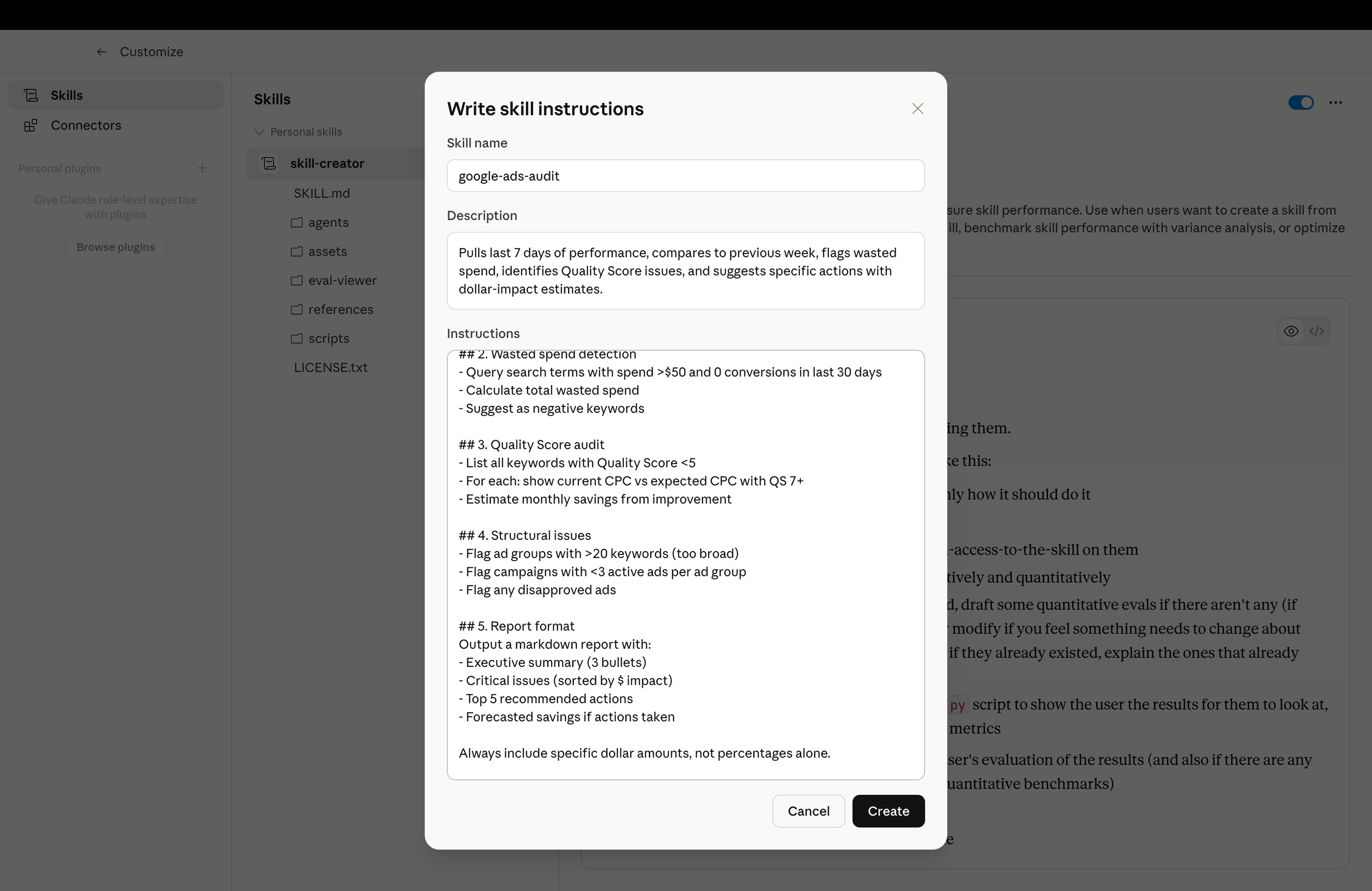
Installed Claude skill ready to use for Google Ads and Meta Ads automation

Skill installed and ready — trigger it with the example prompt from any skill below

The 10 Claude Skills

Each skill below is ready to copy or download. Install in Claude, then use the example prompt to trigger it. All skills assume you’ve connected the MCP in Step 1.

01
🔍

Google Ads Weekly Audit

google-ads-weekly-audit.md

Run a comprehensive weekly Google Ads audit covering waste, quality score, and conversion tracking.

What it does

Pulls last 7 days of performance, compares to previous week, flags wasted spend, identifies Quality Score issues, and suggests specific actions with dollar-impact estimates.

google-ads-weekly-audit.md
1---
2name: google-ads-weekly-audit
3description: Run a comprehensive weekly Google Ads audit covering waste, quality score, and conversion tracking
4---
5
6# Google Ads Weekly Audit
7
8When the user asks for a Google Ads audit, use the connected Google Ads MCP to:
9
10## 1. Account health check
11- Pull last 7 days of campaign performance
12- Calculate account-level spend, conversions, CPA, ROAS
13- Compare to previous 7 days — flag any metric that changed by >20%
14
15## 2. Wasted spend detection
16- Query search terms with spend >$50 and 0 conversions in last 30 days
17- Calculate total wasted spend
18- Suggest as negative keywords
19
20## 3. Quality Score audit
21- List all keywords with Quality Score <5
22- For each: show current CPC vs expected CPC with QS 7+
23- Estimate monthly savings from improvement
24
25## 4. Structural issues
26- Flag ad groups with >20 keywords (too broad)
27- Flag campaigns with <3 active ads per ad group
28- Flag any disapproved ads
29
30## 5. Report format
31Output a markdown report with:
32- Executive summary (3 bullets)
33- Critical issues (sorted by $ impact)
34- Top 5 recommended actions
35- Forecasted savings if actions taken
36
37Always include specific dollar amounts, not percentages alone.
38
Example promptRun the weekly audit on my Google Ads account for last week.
02
🔥

Meta Creative Fatigue Detector

meta-creative-fatigue.md

Detect fatigued Meta ad creatives using CTR decline, frequency, and CPM inflation signals.

What it does

Analyzes every active Meta ad for fatigue signals. Rates Critical / Warning / OK. Calculates wasted spend and estimates monthly cost if not replaced.

meta-creative-fatigue.md
1---
2name: meta-creative-fatigue
3description: Detect fatigued Meta ad creatives using CTR decline, frequency, and CPM inflation signals
4---
5
6# Meta Creative Fatigue Detector
7
8When the user asks to check for creative fatigue, use the connected Meta Ads MCP to:
9
10## 1. Pull fatigue signals
11For each active ad running for 7+ days:
12- CTR over last 7 days vs previous 7 days
13- Frequency (avg impressions per user)
14- CPM trend over last 14 days
15- Conversion rate trend
16
17## 2. Scoring logic
18Rate each ad as Critical / Warning / OK:
19- **Critical** — CTR dropped >20% AND frequency >3.5 AND CPM rose >15%
20- **Warning** — CTR dropped 10-20% OR frequency 2.5-3.5
21- **OK** — All metrics stable or improving
22
23## 3. Impact estimation
24For each Critical ad:
25- Calculate wasted spend since fatigue started (spend × CTR decline %)
26- Estimate monthly cost if not replaced
27
28## 4. Recommended actions
29- List ads to pause immediately (Critical)
30- List ads to refresh in next 7 days (Warning)
31- Suggest creative themes based on what performed best historically
32
33## 5. Output format
34Markdown table with: Ad name | Status | CTR change | Frequency | Wasted spend | Action
35
36Always include the specific ad account ID and date range analyzed.
37
Example promptCheck my Meta Ads for creative fatigue in the last 14 days.
03
📊

Cross-Platform ROAS Analyzer

cross-platform-roas.md

Compare ROAS and performance across Google Ads and Meta Ads with deduplication awareness.

What it does

Pulls matched 30-day data from both platforms, segments by funnel stage, flags attribution overlap, and recommends specific budget shifts with estimated impact.

cross-platform-roas.md
1---
2name: cross-platform-roas
3description: Compare ROAS and performance across Google Ads and Meta Ads with deduplication
4---
5
6# Cross-Platform ROAS Analyzer
7
8When the user asks to compare Google vs Meta performance, use both MCP connectors to:
9
10## 1. Pull matched data
11- Google Ads: spend, conversions, revenue, CPA, ROAS (last 30 days)
12- Meta Ads: spend, conversions, revenue, CPA, ROAS (last 30 days)
13- Segment by funnel stage where possible (prospecting, retargeting, brand)
14
15## 2. Platform comparison table
16| Platform | Spend | Conversions | CPA | ROAS | Trend |
17Include week-over-week trend for each metric.
18
19## 3. Deduplication awareness
20Flag any of these issues:
21- Retargeting overlap (both platforms targeting same users)
22- Brand vs non-brand mix imbalance
23- Last-click over-attribution on one platform
24
25## 4. Optimization recommendations
26- If Google ROAS > Meta ROAS by >30%: suggest shifting 15% of Meta budget to Google
27- If Meta ROAS > Google ROAS by >30%: suggest the reverse
28- If close (within 20%): recommend funnel-stage optimization instead of reallocation
29
30## 5. Report
31Markdown with executive summary, comparison table, 3 specific reallocation recommendations with estimated impact.
32
Example promptCompare last 30 days ROAS across my Google Ads and Meta Ads accounts.
04
🚫

Search Terms Cleanup

search-terms-cleanup.md

Mine Google Ads search terms for waste and generate ready-to-paste negative keyword lists.

What it does

Categorizes every search term from last 30 days: waste, low quality, underdeveloped, irrelevant. Outputs a negative keyword list + promotion candidates + forecast savings.

search-terms-cleanup.md
1---
2name: search-terms-cleanup
3description: Mine Google Ads search terms for waste and generate negative keyword lists
4---
5
6# Search Terms Cleanup
7
8When the user asks for search term analysis, use the connected Google Ads MCP to:
9
10## 1. Pull search terms data
11- Last 30 days of search terms across all campaigns
12- Include: query, clicks, spend, conversions, CPA, match type
13
14## 2. Categorize terms
15**Waste** — Spend >$50, zero conversions (add as negative)
16**Low quality** — Converting at >2x target CPA (add as negative)
17**Underdeveloped** — Converting at <50% target CPA with <100 clicks (add as exact match keyword)
18**Irrelevant** — Queries clearly not related to business (add as campaign-level negative)
19
20## 3. Build negative keyword list
21Generate a campaign-ready list:
22```
23- "wasteful query 1"
24- "wasteful query 2"
25- [campaign: X] broad-match-modifier +wasteful +query
26```
27
28## 4. Calculate savings
29Total monthly savings from removing wasted terms = (waste spend / 30) × 30
30
31## 5. Output
32- Top 20 wasteful search terms (with spend)
33- Top 10 terms to promote to keywords
34- Ready-to-paste negative keyword list
35- Total forecast savings
36
Example promptClean up my Google Ads search terms for the last 30 days.
05

Quality Score Optimizer

quality-score-optimizer.md

Identify Google Ads Quality Score issues and generate fixes for CTR, ad relevance, and landing page.

What it does

Audits all keywords by Quality Score tier, identifies which component (CTR, relevance, landing page) is weak, and generates specific fixes with forecasted savings.

quality-score-optimizer.md
1---
2name: quality-score-optimizer
3description: Identify Google Ads Quality Score issues and generate fixes for ad relevance, CTR, and landing page
4---
5
6# Quality Score Optimizer
7
8When the user asks to improve Quality Scores, use the connected Google Ads MCP to:
9
10## 1. QS audit
11Pull all keywords with Quality Score data. Group by:
12- **Critical** (QS 1-3) — Paying 3-5x expected CPC
13- **Low** (QS 4-5) — Paying 1.5-2x expected CPC
14- **Moderate** (QS 6-7) — Close to expected
15- **Good** (QS 8-10) — Paying less than expected
16
17## 2. Component breakdown
18For each underperforming keyword, identify which component is weak:
19- Expected CTR (Below average / Average / Above average)
20- Ad Relevance (Below average / Average / Above average)
21- Landing Page Experience (Below average / Average / Above average)
22
23## 3. Fixes by component
24**Expected CTR weak** — Write 3 new ad variants with stronger headlines matching keyword intent
25**Ad Relevance weak** — Split keyword into dedicated ad group with matching ad copy
26**Landing Page weak** — Flag for landing page audit (use landing-page-checker skill)
27
28## 4. Impact calculation
29For each keyword improved from QS 4 → QS 7:
30- Expected CPC reduction: ~40%
31- Monthly savings: current spend × 0.40
32
33## 5. Output
34Ranked list of 20 keywords to fix (by $ impact), specific action for each, forecast savings.
35
Example promptOptimize Quality Scores across my Google Ads account.
06
🎯

Audience Overlap Detector

audience-overlap-detector.md

Find Meta Ads audience overlap causing internal auction competition and CPM inflation.

What it does

Compares targeting across all active ad sets, detects overlap patterns, estimates CPM inflation and wasted spend, and recommends consolidation with projected CPM reduction.

audience-overlap-detector.md
1---
2name: audience-overlap-detector
3description: Find Meta Ads audience overlap causing internal auction competition and CPM inflation
4---
5
6# Audience Overlap Detector
7
8When the user asks to check audience overlap, use the connected Meta Ads MCP to:
9
10## 1. Pull targeting data
11For every active ad set spending >$50/day:
12- Age range, gender, geography
13- Interest targeting (all layers)
14- Custom audience IDs
15- Lookalike audience sources and %
16- Exclusion audiences
17
18## 2. Overlap detection
19Compare ad sets pairwise. Flag overlap when:
20- Same custom audience included in both
21- Same lookalike source (even at different %)
22- Overlapping interests + same geo + same age
23- No exclusion audiences between them
24
25## 3. Impact estimation
26For each overlap pair:
27- CPM inflation estimate: 10-30% depending on overlap severity
28- Wasted spend: (combined spend) × (overlap % × CPM inflation)
29
30## 4. Consolidation plan
31For each overlap cluster:
32- Recommend which ad set to keep (highest ROAS)
33- List which ad sets to pause or consolidate
34- Suggest exclusion audiences to prevent future overlap
35
36## 5. Output
37- Overlap heatmap (ad set A vs ad set B, severity 0-10)
38- Top 5 highest-impact overlaps with $ waste
39- Specific consolidation actions
40- Projected CPM reduction after fixes
41
Example promptDetect audience overlap across my Meta Ads account.
07
💰

Budget Reallocator

budget-reallocator.md

Reallocate ad budget from underperforming to high-ROAS campaigns across Google and Meta.

What it does

Categorizes every campaign as Scale / Maintain / Reduce / Pause candidate. Proposes specific budget changes with forecasted conversion and ROAS impact.

budget-reallocator.md
1---
2name: budget-reallocator
3description: Reallocate ad budget from underperforming to high-ROAS campaigns across Google and Meta
4---
5
6# Budget Reallocator
7
8When the user asks to optimize budget allocation, use connected MCPs to:
9
10## 1. Pull campaign performance
11Last 30 days across Google Ads + Meta Ads:
12- Daily budget, actual spend, conversions, CPA, ROAS
13- Filter campaigns with <25 conversions (not enough data)
14
15## 2. Categorize campaigns
16**Scale** — ROAS >150% of account avg, impression share lost to budget >15%
17**Maintain** — ROAS 80-150% of account avg
18**Reduce** — ROAS 50-80% of account avg
19**Pause candidate** — ROAS <50% of account avg, 50+ conversions
20
21## 3. Calculate reallocation
22- Sum total account budget
23- For "Reduce" campaigns: propose 20-30% daily budget cut
24- For "Scale" campaigns: propose 20-40% daily budget increase (up to what IS-lost-to-budget allows)
25- Net budget change should be close to zero (reallocation, not increase)
26
27## 4. Forecast impact
28For each proposed change:
29- Expected conversion change based on historical marginal CPA
30- Expected ROAS change
31- Total account-level ROAS lift
32
33## 5. Output
34Proposed changes table:
35| Campaign | Platform | Current budget | Proposed | Reason | Expected conv impact |
36
37Always recommend approval before execution — never auto-execute budget changes above 20%.
38
Example promptReallocate my ad budget for next month based on last 30 days.
08
📑

Weekly Executive Report

weekly-exec-report.md

Generate a stakeholder-ready weekly ad performance report across Google and Meta.

What it does

Produces a one-page executive summary, key metrics table, top 3 wins, top 3 concerns, and 5 specific action items. Written for CEOs and CMOs, not PPC analysts.

weekly-exec-report.md
1---
2name: weekly-exec-report
3description: Generate stakeholder-ready weekly ad performance report across Google and Meta
4---
5
6# Weekly Executive Report
7
8When the user asks for a weekly report, use connected MCPs to:
9
10## 1. Pull data
11- Last 7 days vs previous 7 days
12- All campaigns across Google Ads + Meta Ads
13- Metrics: spend, impressions, clicks, conversions, revenue, CPA, ROAS
14
15## 2. Report structure
16
17### Executive Summary (3 sentences max)
18- Total spend and WoW change
19- Blended CPA and ROAS with trend direction
20- One-line headline finding
21
22### Key Metrics Table
23| Metric | This week | Last week | Change |
24| Spend, Conversions, CPA, ROAS, CTR, CPC
25
26### Top 3 Wins
27Campaigns, ad sets, or creatives that drove this week's improvement. Include specifics.
28
29### Top 3 Concerns
30Where things declined, with estimated $ impact.
31
32### 5 Action Items for Next Week
33Specific, owner-assignable tasks. Include expected outcome for each.
34
35## 3. Writing style
36- No jargon (write for CEO/CMO, not PPC analyst)
37- Always include dollar amounts
38- Always specify which platform
39- Never use "optimize" as a verb — say what specifically to do
40
41## 4. Format
42Clean markdown. Maximum 1 page if printed. Ready to paste into email or Slack.
43
Example promptWrite my weekly exec ad report for last week.
09

Conversion Tracking Validator

conversion-tracking-validator.md

Validate Google Ads and Meta Ads conversion tracking setup for accuracy and coverage.

What it does

Checks conversion action status, pixel health, event match quality, CAPI deployment, and cross-platform consistency. Flags broken tracking before it wastes ad spend.

conversion-tracking-validator.md
1---
2name: conversion-tracking-validator
3description: Validate Google Ads and Meta Ads conversion tracking setup for accuracy and coverage
4---
5
6# Conversion Tracking Validator
7
8When the user asks to check conversion tracking, use connected MCPs + Google Tag Manager knowledge to:
9
10## 1. Google Ads checks
11- List all conversion actions and their status (Active, Eligible, Inactive)
12- Flag any conversion action with 0 conversions in last 30 days (likely broken)
13- Check conversion tracking tag status (firing, not firing, unverified)
14- Verify Google Ads-GA4 import status
15- Check enhanced conversions enablement
16
17## 2. Meta Ads checks
18- Pixel event status (active, inactive, low quality)
19- Event match quality score for each pixel event
20- Conversions API (CAPI) deployment status
21- Aggregated Event Measurement configuration
22- Deduplication setup for pixel + CAPI
23
24## 3. Cross-platform consistency
25- Compare conversion counts: Google Ads conversions vs GA4 vs Meta pixel
26- Flag >20% discrepancy between platforms for same event
27- Identify attribution model differences causing discrepancies
28
29## 4. Common issues to flag
30- Duplicate conversions counted
31- Conversion action using "count: every" when should be "count: one"
32- Missing event parameters (value, currency)
33- Conversion lag not configured properly
34
35## 5. Output
36Markdown report:
37- Critical issues (fix today)
38- Warning issues (fix this week)
39- Optimization opportunities
40- Specific step-by-step fix for each issue
41
Example promptValidate conversion tracking across Google Ads and Meta Ads.
10
🖥️

Landing Page Checker

landing-page-checker.md

Analyze landing pages behind ads for performance issues hurting conversion rates.

What it does

Maps ads to destination URLs, checks load time, mobile-friendliness, headline-intent match, form length, CTA visibility. Calculates dollar impact of each issue.

landing-page-checker.md
1---
2name: landing-page-checker
3description: Analyze landing pages behind ads for performance issues hurting conversion rates
4---
5
6# Landing Page Checker
7
8When the user asks to check landing pages, use connected MCPs to:
9
10## 1. Map ads to landing pages
11- Pull all active ads from Google Ads + Meta Ads
12- Extract destination URLs
13- Group by landing page (ignore UTM parameters)
14- Calculate spend driving to each page
15
16## 2. Analyze each landing page
17For pages with >$500/month in ad spend:
18- Fetch the page (use research tools if available)
19- Check page load time (PageSpeed Insights)
20- Check mobile-friendliness
21- Verify main headline matches ad copy intent
22- Count form fields (if form present)
23- Check above-the-fold CTA visibility
24
25## 3. Flag issues
26**Critical** — Page load >4s, broken page, form >7 fields, no CTA above fold
27**Warning** — Load 2-4s, headline mismatch, weak value proposition
28**Minor** — Small UX issues
29
30## 4. Calculate impact
31For each Critical issue:
32- Estimated conversion rate hit (10-40% depending on issue type)
33- Monthly cost of the issue = monthly spend to page × conversion rate loss
34
35## 5. Output
36Ranked list of landing pages by $ impact of issues. For each:
37- Current issues
38- Specific fixes (copy suggestions if relevant)
39- Expected conversion rate lift after fixes
40- Priority (P0/P1/P2)
41
Example promptCheck all landing pages my ads point to for performance issues.
Tools like Ryze AI take skills a step further — running every one of these workflows automatically, 24/7, without you needing to trigger them. Think of skills as DIY; Ryze AI as done-for-you.

Ryze AI — Autonomous Marketing

Skip the skills — let AI run your ads 24/7

  • Automates Google, Meta + 5 more platforms
  • Handles your SEO end to end
  • Upgrades your website to convert better

2,000+

Marketers

$500M+

Ad spend

23

Countries

Frequently asked questions

Q: What are Claude Skills?

Markdown files with YAML frontmatter and instructions. Upload to Claude to give it specialized behaviors. Each skill here is a ready-to-use SKILL.md file.

Q: Do I need Claude Pro?

Yes for the MCP connection that powers these skills. The skills themselves are free to download and modify.

Q: Can I modify these skills?

Yes — they’re plain markdown files. Download, edit the thresholds or instructions, upload the modified version.

Q: How do I install a skill?

In Claude, go to Projects or Skills, click Add, upload the .md file. Claude immediately recognizes it.

Q: Do I need the MCP connection?

Yes for skills that query live data. Without MCP, you’d need to paste CSV exports manually. MCP takes 3 minutes to set up.

Q: Are these free?

Yes. Free to download, modify, and use. No attribution required. We built them because they save us hours every week.

Ryze AI — Autonomous Marketing

Stop writing skills. Let AI run your ads for you.

  • Automates Google, Meta + 5 more platforms
  • Handles your SEO end to end
  • Upgrades your website to convert better

2,000+

Marketers

$500M+

Ad spend

23

Countries

Live results across
2,000+ clients

Paid Ads

Avg. client
ROAS
0x
Revenue
driven
$0M

SEO

Organic
visits driven
0M
Keywords
on page 1
48k+

Websites

Conversion
rate lift
+0%
Time
on site
+0%
Last updated: Apr 14, 2026
All systems ok

Let AI
Run Your Ads

Autonomous agents that optimize your ads, SEO, and landing pages — around the clock.

Claude AIConnect Claude with
Google & Meta Ads in 1 click
>